Known Participant
September 21, 2017
Question

Pushing inward in Z space causes 2d layer to appear

  • September 21, 2017
  • 3 replies
  • 752 views

Hi I'm stuck on trying to figure out why this is happening.

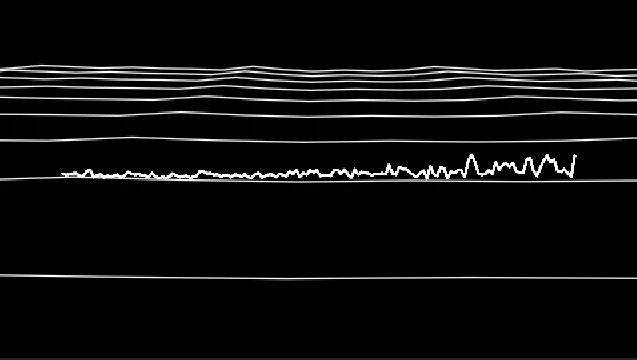
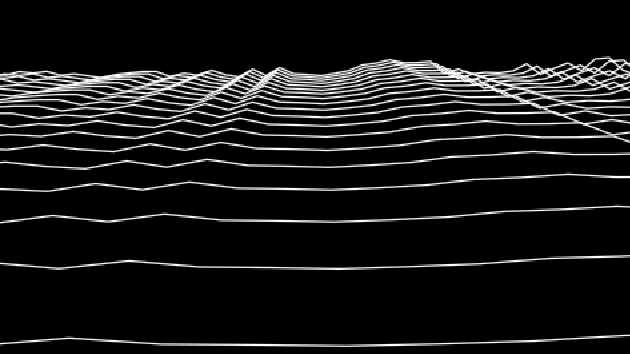
So I have a bunch of waves in 3D that I made using Audio Spectrum. When I push the camera in on the Z axis the original 2D layer will appear behind them at a certain point. It does not have it's own layer, it's spawning from the 3D layers.

How do I get rid of that?

Please and thank you for your help.

Screens attached.
This topic has been closed for replies.

3 replies

Kevin J. Monahan Jr.
Legend
October 6, 2017

Hi GrifX,

Sorry for this issue. Did you ever find a solution? Please let us know if you have or if you still need help.

Thanks,

Kevin

Kevin Monahan - Sr. Community and Engagement Strategist – Adobe Pro Video and Audio
GrifXAuthor
Known Participant
October 6, 2017

No solution was found. Seems to be a bug with collapse transformation, z space and the audio spectrum effect.

Kevin J. Monahan Jr.
Legend
October 9, 2017

Hi GrifX,

That's terrible. Can you file a bug here?

Thanks,
Kevin

Kevin Monahan - Sr. Community and Engagement Strategist – Adobe Pro Video and Audio
Community Expert
September 21, 2017

Can you try turning off the eye on the 2d layer?

GrifXAuthor
Known Participant
September 21, 2017

That would turn off the 3d layer.

Mylenium
Legend
September 21, 2017

This is an ages old bug/ issue in the plug-in itself. When you push in too close at some point it starts to act weird because it seems to be unable to determine the correct size of the layer and render the waveform. Simply pre-compose your layers.

Mylenium

GrifXAuthor
Known Participant
September 21, 2017

Thank you for the reply.

I've already pre-composed and did a export render. No luck.