
Inspiring
October 19, 2024
Question

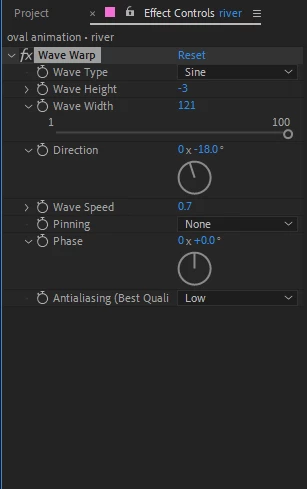
question about "Wave Warp" effect
  • October 19, 2024
  • 2 replies
  • 617 views

hi all, i have a layer added the "wave warp" effect, and i want it not just keep waving, i hope it can gradually start/stop waving , but on that "wave warp" panel i don't see the stopwatch that i can set the keyframe. do you know how i can do it?

thank you in advance.

This topic has been closed for replies.

2 replies

Mylenium
Legend
October 21, 2024

Create a custom displacement map in a pre-comp and animate the parameters there, then reference it using the Displacement Map effect. A simple repeating black-white-black gradient will do for a sine wave. Wave Warp uses some odd rounding math to produce "clean" wave patterns and that likely is why things start to jump when you animate parameters in a certain way.


Mylenium

Community Expert
October 19, 2024

Animate the wave speed down to zero and the wave height down to zero.

Inspiring
October 21, 2024

it is very weired,  after I did it, the object which i applied the  "wave warp" will intensely shake before it is completly stop waving.