Participant
December 5, 2019
Answered

Radial Repeater

  • December 5, 2019
  • 2 replies
  • 3145 views

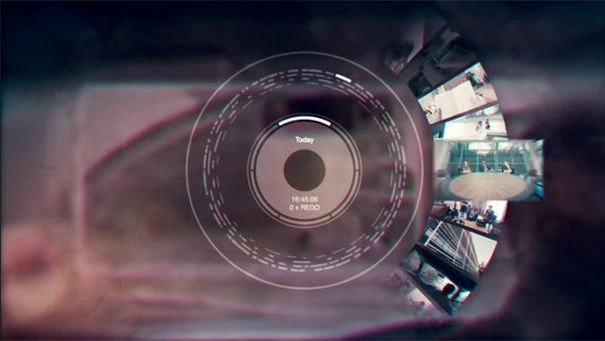
Im trying to make a GUI that was used in black mirror as shwon below, but I am not sure how to add randomness to the radial repeater.Or if there is better way to do this I would appreaciate it! 

I am kind of new to AE 

Thanks Henry

This topic has been closed for replies.
Correct answer Mike_Abbott

You need to set up a shape layer like this:
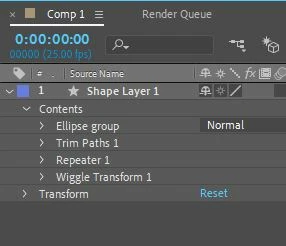
 

An ellipse  (circle) : )

Trim paths: Set end to 2%
Repeater: Set copies to 40,  'transform repeater' position offset to 0.

Wiggle transform: Correlation : 0, Transform: rotation: to maybe around 2 revolutions.


Adjust all above parameters to taste : )


If you want to get really clever...

you can add another repeater at the bottom: Copies: 4, Position: 0, Scale 110%, Rotation: 90 degrees.

then drag the stroke out of the top Ellipse group and place it right at the bottom of the stack.


Result:

RadialRepeater.mp4 

2 replies

Mike_Abbott
Legend
December 6, 2019

In the stroke settings - set the line caps to round.

Mike_Abbott
Mike_AbbottCorrect answer
Legend
December 5, 2019

You need to set up a shape layer like this:


An ellipse  (circle) : )

Trim paths: Set end to 2%
Repeater: Set copies to 40,  'transform repeater' position offset to 0.

Wiggle transform: Correlation : 0, Transform: rotation: to maybe around 2 revolutions.


Adjust all above parameters to taste : )


If you want to get really clever...

you can add another repeater at the bottom: Copies: 4, Position: 0, Scale 110%, Rotation: 90 degrees.

then drag the stroke out of the top Ellipse group and place it right at the bottom of the stack.


Result:

RadialRepeater.mp4 
Community Expert
December 6, 2019

Your screenshot is showing images. The easiest thing to do is to have all images selected, move the anchor point of all images to somewhere below the bottom of the image and centered horizontally, then add a null and then shift + Parent all of the images to the null. This will snap the anchor point of every image to the position (anchor point) of the null. Now you can either expose the rotation properties of all the layers and manually keyframe each layer so that it moves around the circle the way you want or add an expression that looks at the layer above it and adds something to the rotation value. If you put the null on the top then added an expression control slider to the null you could add this expression to the image layers below and use the slider to fan the images out like a deck of cards. 

r = thisComp.layer("Null 1").effect("Slider Control")("Slider") ;
rv = index;
r * rv

You would end up with something like this if you added the expression to the first image layer, copied the expression only, then pasted it to all of the other layers.

You could play with the math or even add some randomness with another slider and get things to move just about any way you want them to.