


MahaB82A
April 13, 2025
Question

Rasterizing

  • April 13, 2025
  • 1 reply
  • 335 views

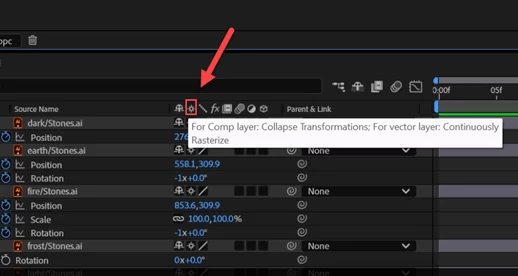
I have confusion over Rasterizing. Rasterizing means process of converting a vector or smart object into pixels. Vector images are more clear than pixel image when zoomed in.


But here after Rasterizing only images get more clear. Why is it called Raster?


1 reply

nishu_kush
Legend
April 25, 2025

Here's what the product team suggested: It’s actually called Continuously Rasterize, which means that it does any resizing on the vector version and then converts it to pixels, so it’s clear. As opposed to rasterizing at the beginning of the process and then resizing, which would mean scaling up pixels which could cause artifacts.

Example:
  1. Import an Illustrator file into an AE comp. Between time 0:00 and 1:00, animate its scale from 100% to 10,000%.
  • Preview, note how the content in the AI file gets jaggy as it scales up, as it was rasterized into pixels (and cached) just once — when imported into the comp.

2. Now enable the Continuously Rasterize switch.

  • Preview, note how the content in the AI file stays smooth as it scales up, as a new set of pixels are being rasterized from the .AI file (at a new scale) for each frame of the comp.

Hope it helps.


Thanks,
Nishu

MahaB82A
MahaB82AAuthor
April 25, 2025

"Continuously Rasterize" means rasterizing takes place while the process of importaing illustractor files because Ae only accept "Rasterize" illustrator files. Then Rasterize switch in Ae is used in order to fine-tune the image. Does it what product team explanation mean?