
Participant
April 13, 2018
Question

Real world dimensions After Effects

  • April 13, 2018
  • 4 replies
  • 1148 views

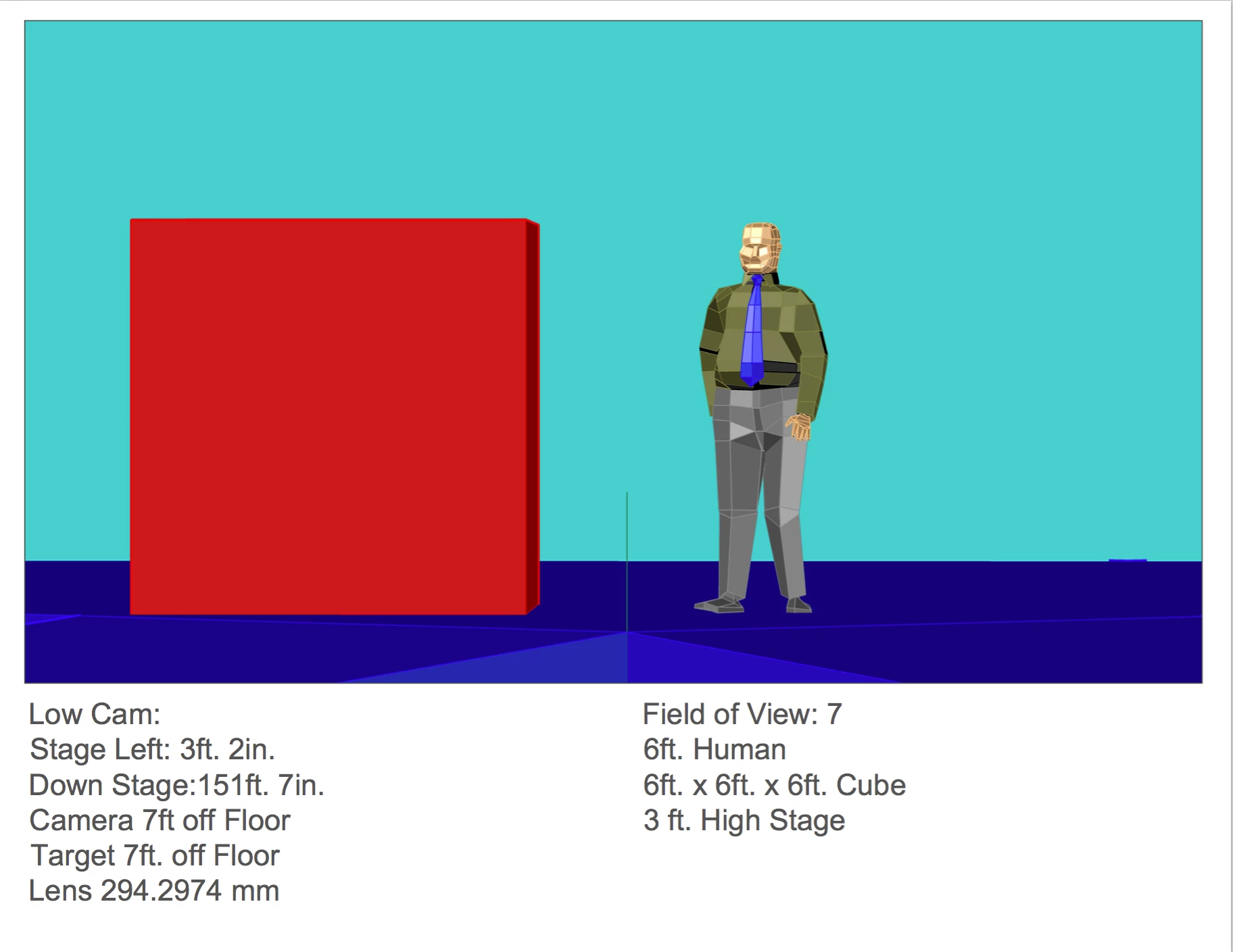
I'm making a 3D animation for an event. At the event, two cameras will be filming a man while he is making a presentation. This footage will be shown on large monitors behind him and the 3D animation will be inserted into that video, so it looks like the animation is happening next to him. I know the distance the cameras will be from the stage and also their angles (one will be dead on and the other will be off to the right and slightly angled). How do I translate those real-world distances/angles into After Effects so I can figure out where to place my cameras in my composition?

Camera 1
Camera 2

This topic has been closed for replies.

4 replies

Legend
April 15, 2018

Provided you can get the cameras set up before you need to render the CG, then just do what we all do - put something in the target position that you know the size of. So that you can get the perspective right as well as the size, mark a large square on the floor with colored tape (you only need the corner points), then put a box of the same RWS into your 3D scene and adjust the camera until it lies in the same footprint.

Roland Kahlenberg
Legend
April 15, 2018

You need to bring a computer to the site as soon as you can. Prepare a few still graphics with circles and squares and a well-measured grid. These will help you ascertain perspective (if any) and the matte you require - launch AE and load these graphics into your comp - set output in such a manner that you Comp view is cleanly projected from each projector.

You keep mentioning about camera placement but the projector placement is also crucial - this is the source of your image/overlay.

Very Advanced After Effects Training | Adaptive & Responsive Toolkits | Intelligent Design Assets (IDAs) | MoGraph Design System DEV
Mylenium
Legend
April 14, 2018

Read up on how projection mapping is done and what tools are used for this stuff. The rest is irrelevant. AE doesn't do realworld units, so you could just as well eyeball it. Ultimately it doesn't matter what camera settings are used, as long as it looks reasonably real.

Mylenium

Community Expert
April 13, 2018

I am not sure I completely understand your question. I'm not sure why you need to match the cameras. I assume that the audience will be viewing the scene from multiple angles. I also assume that the video will be shown on the red cube. On the other hand, the video may be projected on the back wall. In either of those cases, everyone in the audience and the camera will be looking at the same sized image. You just have to decide how big to make those images in relation to the frame size.

If you are planning to create a virtual world that the presenter can walk around in then you need screens on different planes to give some perspective to the shot. If you are trying to match any camera moves by your A and B camera then you are going to have to do some camera tracking and insert your footage that way, but if this is a live event then the audience is not going to be able to make sense of the changing perspective and the camera moves in the live event will have to be perfectly in sync with the camera moves in the set.

I need a way more detailed explanation of what you are trying to do. If the presenter is going to be moving around the stage and the video is projected in the background or on the cube next to him there is nothing to figure out except the size you want the objects in the animation to be relative to the size of the screen. If the projection on the back wall is 20' high and you want something on that screen to look like it is 10 feet tall then it needs to half the height of the composition. If you are going to use 10 monitors to create that back wall then you need to know how you are supposed to feed those 10 monitors. I recently saw a nine-monitor setup that was fed a single 4K stream and it looked great. The playback system just split the signal. Our local library has a video wall that is 4 monitors high and 7 monitors wide. They just feed all of those monitors a single HD stream and it looks pretty good. I've also seen multi-monitor setups that run a separate 1080 or 720 16:9 feed to each monitor and the feeds are synced.

Sorry, I can't be of much help but from your description of the problem, the only thing I think you need to do is figure out how much of the frame you need to fill with an element in the animation. Adding or tracking a camera is not going to make any difference to the audience or the cameras photographing the presenter.

One last thought: If there are going to be multiple monitors on stage and you want to create a virtual world for the presenter to walk around in all you have to do is figure the relative distance between the monitors and the height of each monitor and set up your planes using the same ratio. Let's say that your front monitor needs to have an element fill 1l2 of the height of the screen and the back monitor needs to see an extension of that object but it is 10 feet upstage. If both monitors are 10 feet high and you are producing in HD, 1920 X 1080 then 10 feet is 1080 pixels. You simply place your back layer 1080 pixels away from the front layer. Front layer 960, 540, 0, back layer 960, 540, 1080. Now the distance between the monitors on the stage is in exactly the same ratio as the layers in the comp. If the audience is supposed to see this work then you need to position your AE camera in the middle of the audience. How far is it from the front layer to the center of the audience? Let's say it is 40 feet. You position your camera at 1080 * 40 pixels in Z, The focal length does not matter at this time. That means the starting position for the camera is 960, 540, -4320.

Once the camera is positioned, you press the A key twice to reveal the camera properties and adjust the zoom value until the object on the front screen fills half the frame. You're done. Animating that camera, if you are creating a virtual set, will make the audience seasick. If the screen flat, there was no need for those calculations. Either of the cameras filming the talent will reflect what an audience member sees from a seat at the same position.

The more I think about this the more I think that you are way overthinking the project. I cannot think of a single reason to calculate camera position for your AE comp unless you are trying to create a virtual set and if that is the case and you want cameras to match you will need a separate comp for each camera and each camera will have to record a separate version of the presentation.

Participant
April 14, 2018

Hey, I probably am overthinking it but let me clarify the project. The cube is just a stand in for the 3D hotel we are animating, nothing will be projected on a cube. The two cameras are filming the live event from those two angles. The audience will see nothing on stage next to the presenter in real life. But on large screens behind him, the feed from the two cameras will be playing and they will insert our 3D model next to the speaker (where the red cube is). We have to render two versions of our animation that match those camera angles so it appears as if the hotel animation is next to him from those two angles.  Did that explanation help clarify the project? Do I just eyeball it and approximate what percentage of the screen the hotel would take up next to him?

Community Expert
April 15, 2018

Ok, I get it now. So somebody is going to be live switching between the cameras and the screens in the background will show the presenter with the 3D mode.

Perspective is controlled by camera position, framing by focal length. If you want to get fairly accurate and not have the model seem to float the cameras filming the presenter cannot move. They have to be locked off. Then you can take the ratios that I have already explained and figure out how far to place the AE camera away from the model and then just rotate the model to match the angle you are going to get from each camera. Then you just adjust the focal length, like I explained before so that the framing is about right.

Once again, if the cameras filming the presenter move at all while the 3D model is keyed into the shot things will look really odd because, without motion control on those cameras, the timing of any camera movement will not match up. If it were my production I would have one locked off wide camera shooting pretty much center stage. I would build my 3D model for that camera. I would put the second camera at an angle so the 3D model would not be in the background and just shoot close-ups of the presenter with that camera. I've done a lot of live television and concerts with projection and that's the only way I can think of to pull this off without motion control.