Participating Frequently
April 30, 2019
Answered

Realistic Neon Flicker [noob request]

  • April 30, 2019
  • 1 reply
  • 12840 views

Hello!

I'm fairly new to After Effects and I'm using the most recent update [16.1.1 (build 4)]

I'm trying to create a neon light that begins inactive, then flickers with increasing frequency, until it becomes 100% active.

I could animate each key frame, but I know there has to be a more efficient method. I know I can use the wiggle expression, but I can't find a way to animate the parameters to achieve this effect. I tried using the Slider Control, but that didn't work because I couldn't figure out how to make the effect go from inactive, to increasingly active, to 100% active.

I've seen several tutorials, but none of them show a way to do what I'm picturing. I considered clipping the layer and pasting an "off" version at the beginning, and an "on" version at the end, but I would genuinely love to learn and know if there's a way to accomplish my vision with a single layer.

Thank you for taking the time to read and respond.
This topic has been closed for replies.
Correct answer Rick Gerard

Bear in mind that neon is either on or off. It doesn't "fade" up and down, which is what all the various suggestions are doing.


If you want to get absolutely accurate about a neon animation there would be just a couple of frames where the start and end of the tube would have a different intensity and color as the AC voltage is applied.  Neon light flickers all the time at the same frequency as the current. Try shooting a neon sigh at 100 fps and see what you get. When designing a visual effect it is always a really good idea to look at some actual footage of the thing you want to create. There is lots of footage of neon tubes available.

My point is that a realistic startup always involves an arc pulsing at the start and end of the tube to get the ionized gas to light up. If the power supply is tired the arc will start and stop causing the light to flicker on and off as the arc starts and stops, but there is no difference in the intensity. The arc always makes noise, and the transformers handling the load almost always also make a little noise and that sound reinforces the visual effect of the startup flicker.

This video has a closeup of the electrode energizing the neon.

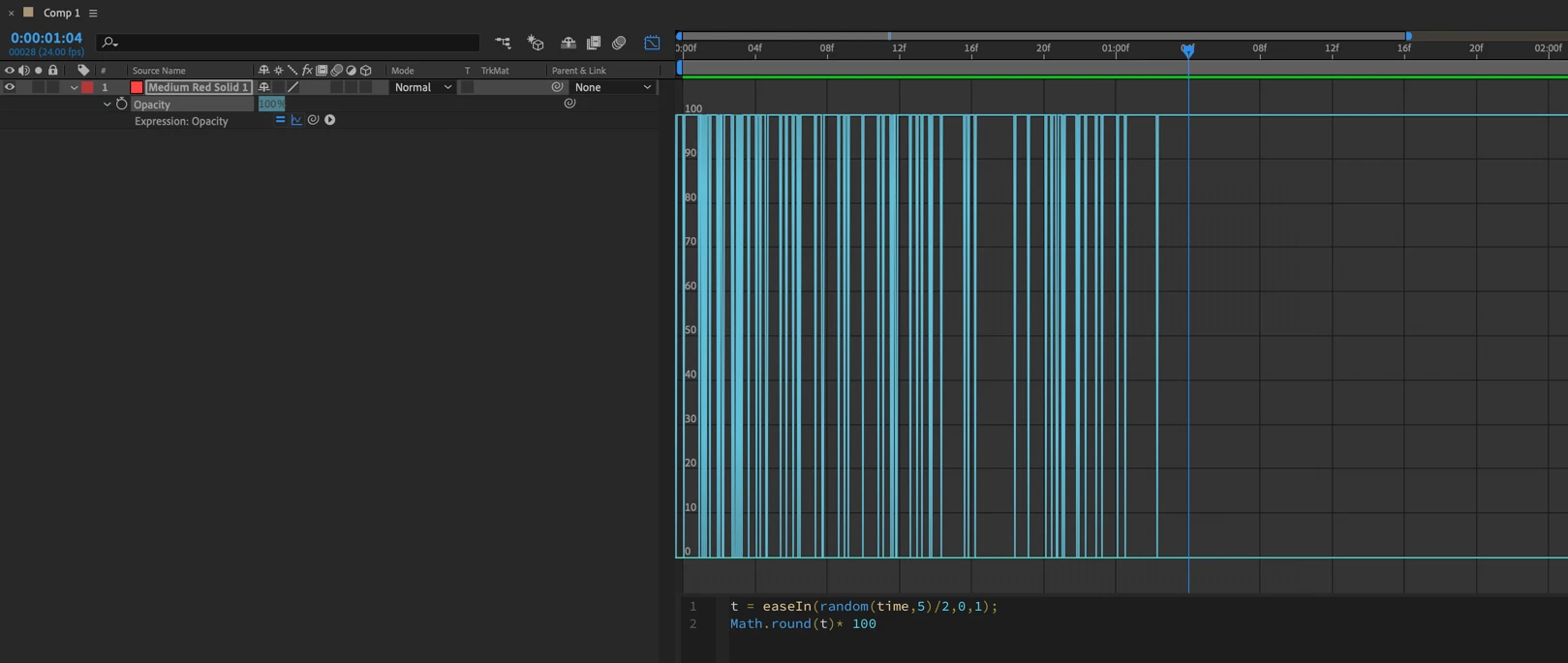
Unfortunately, the random time expression would not give you anything that actually looks like a neon tube flickering as it turns on. A similar approach to the expression I already posted would give you the on and off startup required to create a fairly realistic neon light startup. Modifying value1 and value2 to zero and 1, then multiplying the result by 100 would do the trick. Something like this:

If I wanted a one-second random startup for a neon tube without the other nuances that would sell the effect I might use this expression:

t = easeIn(random(time,5)/2,0,1);

Math.round(t)* 100

But the effect would be much more believable if you synced it to an audio effects track.

1 reply

Kyle Hamrick
Community Expert
Community Expert
May 1, 2019

There's definitely value in learning how to do things with expressions, but this example is short enough that keyframes are probably the best route.

Participating Frequently
May 2, 2019

Thank you for taking the time to respond

That's fair, but I would really like to know how to do this for my own knowledge. I just learned about the random() expression, so I'm going to give that a try.

Participating Frequently
May 3, 2019

Hi. Have a look at the Strobe Light effect. Add it to an "off" version of your image, then place an "on" version on the layer underneath(without the effect). Set "Strobe" to "Makes Layer Transparent" and set and keyframe the Duration and Period. Set the Random to a high setting to get variety.