
j.khakase
Inspiring
July 9, 2025
Answered

Rearrange images in grid

  • July 9, 2025
  • 3 replies
  • 606 views

Hello Friends,

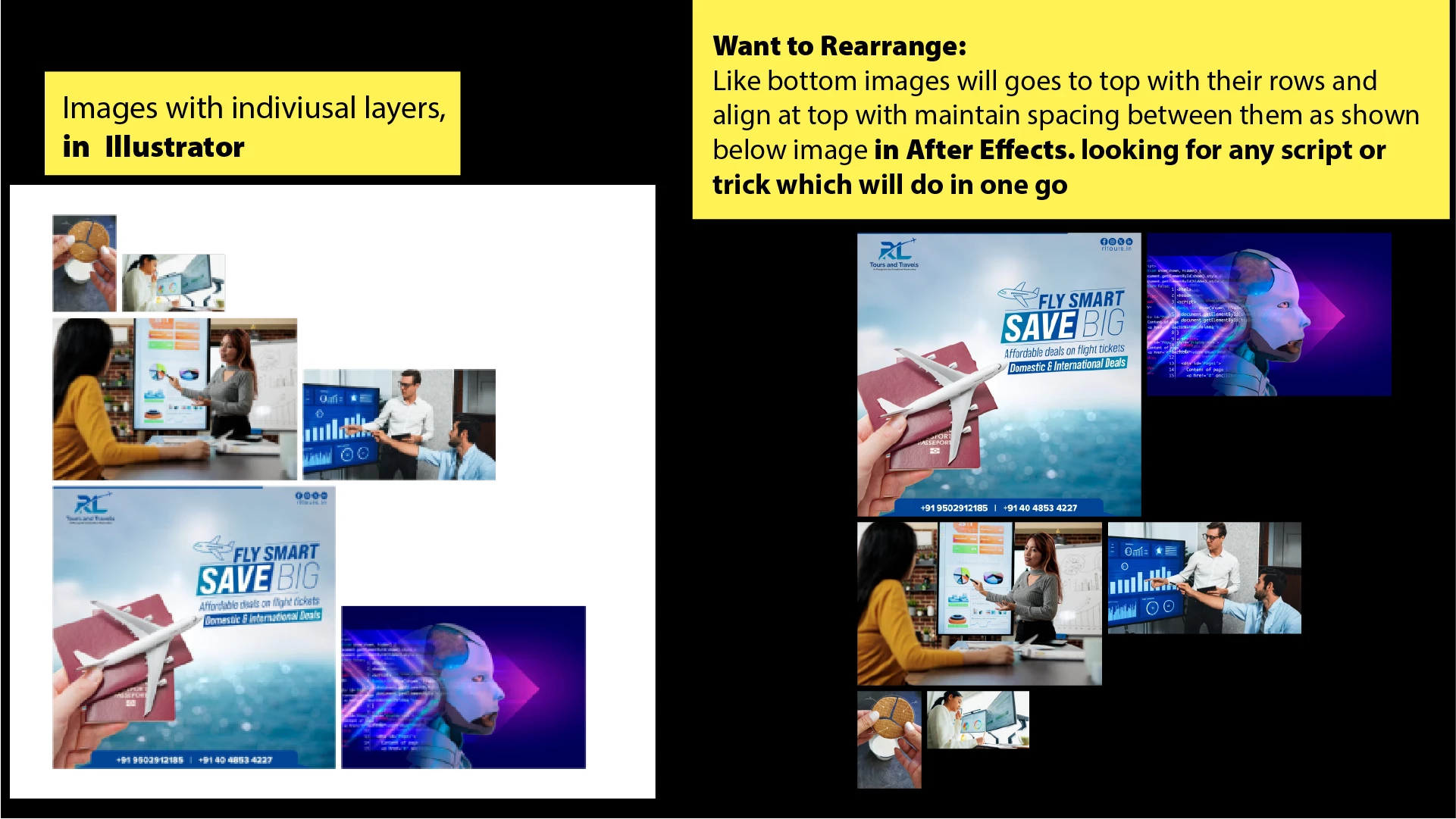
Please help me on below situation:

This is updated image, previous image wrong , sorry for it.
 

Correct answer Gary Reisman @NBC

That's a rather unique situation.   There are a number of script that will create a traditoinal  grid (including my own https://aescripts.com/splitgrid/ ), but those assume images of equal size.  Tho what you're looking to acheive  is far more specific.   
If it's not someting you  see yourself doing regulary, you can fairly easily pull this off using the Align tool in AE, using a combination of Distribute and Align.
If you're looking for a way to automatically adjust based on different sizes, you might be abe to set up fancy expressions that could automate things a bit,  tho would take some setting up. 

3 replies

Gary Reisman @NBCCorrect answer
Inspiring
July 15, 2025

That's a rather unique situation.   There are a number of script that will create a traditoinal  grid (including my own https://aescripts.com/splitgrid/ ), but those assume images of equal size.  Tho what you're looking to acheive  is far more specific.   
If it's not someting you  see yourself doing regulary, you can fairly easily pull this off using the Align tool in AE, using a combination of Distribute and Align.
If you're looking for a way to automatically adjust based on different sizes, you might be abe to set up fancy expressions that could automate things a bit,  tho would take some setting up. 

j.khakase
j.khakaseAuthor
Inspiring
July 15, 2025

Thank you, this is great script, what should be add in expresssion to achive the result like this? I am really sorry by mistake I was upload wrong image which is now updated about requirement.

Inspiring
July 15, 2025

So you wish to bring in an illustrator file, have it separate the groups and then re-arrange in a special grid format?
I'm not even sure if After Effects can interpet Illustrator files like that on import, which is also a very specific need.

At this point, I would first look if that is possible, and then figure a way to arrange them manually using the Align tools.   


RobBarrett
Community Expert
Community Expert
July 9, 2025

Hi @j.khakase, for aligning in this way (maintaining specific and consistent spacing between elements) I can recommend the Align Pro tool, which you can find at aescripts.com. Please note that this is a paid third-party tool.

j.khakase
j.khakaseAuthor
Inspiring
July 13, 2025

Yes, I know Align Pro tool but there is no option to shift bttom images at top and top images at bottom with single click

RobBarrett
Community Expert
Community Expert
July 13, 2025

I misunderstood what you were trying to do. Is there a reason you want this to be a one-click solution? I'm doubtful that there's an existing tool that will do this in a single step, but depending on why you want to do this, there might be different ways to approach it.

nishu_kush
Community Manager
Community Manager
July 9, 2025

Hi there,


Thanks for reaching out. From what I understand, you're trying to arrange your layers and maintain spacing between them. Is that correct? Have you tried using the Align panel in After Effects? Here's how: https://adobe.ly/44SPfXS

Let me know.


Thanks,
Nishu
