Participant
September 7, 2017
Answered

Red values in Effect Controls panel

  • September 7, 2017
  • 3 replies
  • 38245 views

Hi

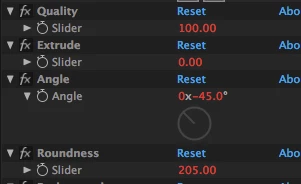
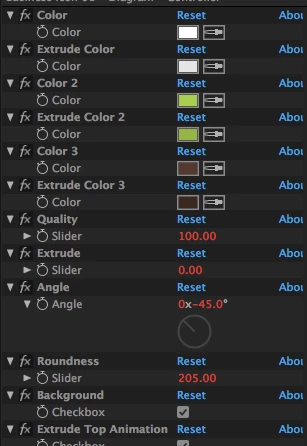
Every time I am trying to edit the number in effects controller, is it not possible. The numbers are red, and its really frustrating.

Please help me

[Title edited for clarity. — Mod.]

This topic has been closed for replies.
Correct answer angie_taylor

These values that are red are being controlled by expressions. To edit them, select the layers in the Timeline and double-hit the E key to expose the Expressions. If you are not comfortable editing Expressions you can select the properties, then go to Animation > Keyframe Assistants > Convert Expression to keyframes.

hope this helps

3 replies

angie_taylor
angie_taylorCorrect answer
Legend
September 7, 2017

These values that are red are being controlled by expressions. To edit them, select the layers in the Timeline and double-hit the E key to expose the Expressions. If you are not comfortable editing Expressions you can select the properties, then go to Animation > Keyframe Assistants > Convert Expression to keyframes.

hope this helps

Participant
September 8, 2017

Hi, it didnt work, the values are still red

Community Expert
September 8, 2017

If the values are still red then you didn't follow the instructions properly and the expressions are still in the timeline. Carefully read what Angie said and follow the instructions. To learn about expressions type expressions in the search help field and so some studying so you can see how they work and where they are in the timeline.

ericsten
Inspiring
September 7, 2017

This typically means they're being driven or determined by another controller through their expression, therefore they cannot accept a manual input. You'll have to dive down into the expression to figure out what's giving them their value. Right-Click "Reveal in Timeline" and drop down the arrow for the effect to see the expression.

Dave_LaRonde
Inspiring
September 7, 2017

Those red numbers indicate that the values are determined by expressions.  You can disable the expressions if you want.