
Legend
December 31, 2019
Answered

Refine Edge Tool not working right, turning image into a hologram.

  • December 31, 2019
  • 2 replies
  • 4815 views

Hello,


I have to replace the background TV image with a generic one, but an actor is in front of the tv set.  I did camera tracking and installed a new tv image, then I had to mask the actors hair and lay that over the new tv image.  Hope that makes sense.


I roto'd his hair using RotoBrush.

You can see here, the NEW "hair" is in front of the NEW tv screeen.
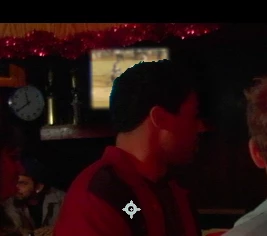
 

Of course, it's only the PhotoBrush tool, so it's very crisp and his hair "wiggles" when the actor moves.


So, it's time to detail that hair line out with the Refine Edge Tool....

I only used it on his hair line, only the part that is blocking the tv screen...

and got this:
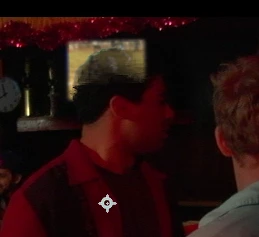


It's eating away at the main image and giving it a ghosty look.


I've been thru dozens of lessons, and can't figure out what I'm doing wrong?


I did it again, outlining the entire head and shoulders, got same results.


There is lots of contrast between the hair and the tv screen, so it should be a simple mask... ??


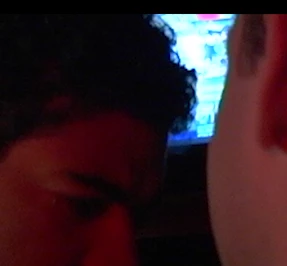
BTW, this is what his hair looks like in a regular shot:
 

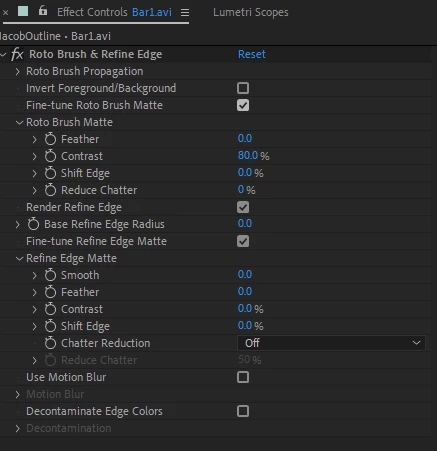
Clean stock settings:
 

Thanks for your help.

Letty


This topic has been closed for replies.
Correct answer Rick Gerard

Thanks, I'm on it.


also, is it possible to just invert your technique and isolate (mask) the actor, instead of the tv?


On some shots I'd like to place a painting behind the actor, that is bigger than the tv.


Thanks Rick!

Have a great day.


The most efficient technique for creating a procedural matte depends entirely on the shot. Underexposed footage with a lot of noise and little contrast is the most difficult to work with. Add compression artifacts and MPEG IBP frame sampling and the problem gets worse. You have to plan and execute your shots with separating foreground and background elements in mind. Even if you plan to use Rotobrush or do manual Roto work, the footage has to be shot with that workflow in mind so you have a reasonable chance to create the matte in a reasonable amount of time. For the shot you supplied, there is no way to create any kind of procedural matte to separate the actors from the background because there are no distinct edges, very little contrast, a lot of noise, and no color differences. Rotobrush creates a procedural matte, so that won't work either. The only hope is to carefully animate a mask by hand. The movement is smooth enough that I don't think the keyframes would have to be any less than every 10 frames, and you're going to have to do what you can to hide the hair detail in the shadows. Combine the roto by hand with a procedural matte from the bright TV will make it a lot easier to separate the actors from the background.

2 replies

Community Expert
January 4, 2020

If the MPEG file you provided as an example is the original footage you have some pretty huge problems to overcome right off the top. Looking at the footage with a Magnification ratio of 400% shows a lot of problems that need to be overcome.

The footage is underexposed, noisy because it was probably shot at a high ISO, and there are huge color artifacts caused by the MPEG compression. The other big problem, the footage was shot at 23.976 so the TV is not going to be in sync and the picture is going to flutter. You have to think of all of those things when you plan a shot like this. 


Because the TV in the background is a lot brighter on average than the foreground I duplicated the footage layer, drew a garbage mask around the TV, applied Lumetri Color and adjusted the color wheels to turn everything darker than the TV screen Green. The results looked good enough to give me a starting point for a procedural mask.

Then I added Keylight to the project to try and generate a decent alpha channel. The results were pretty good so I could use the duplicate layer as an Alpha Track Matte for the original footage and put my replacement TV image below. So you could have access to all the footage I just used a time-remapped and color corrected and scaled copy of the original footage as the source for the replacement screen and added some blur and a few other effects to make it look like a black and white TV. The results are about as good as I think you are going to get with the footage you supplied:

The final step would be to add some light wrap and fine-tune the color correction for the entire scene. Here's the Project file for you. https://www.dropbox.com/s/w6mzojz0z4norsv/bar%20shot%2815.x%29.aep?dl=0


If your browser adds a .txt extension the AEP you can just delete it. I suggest you go through the comp and check the modified properties of all layers and effects so you can see what I was trying to do. There are a couple of other approaches that I could have taken but this was my first idea.


The biggest problem with trying to replace the TV screen is that the footage was not shot very well and no consideration was given to the problems associated with the visual effects work that you wanted to do. If you cannot reshoot and you are stuck with MPEG footage that is highly compressed you'll have to accept the compromise.


The result is not perfect in any way and still needs color correction and light wrap but this is what the AEP generated:

There is a little edge flicker at the beginning but that should be able to be corrected. The whole project took me about 15 minutes.

Letty2019Author
Legend
January 5, 2020

Wow!  15 mins?  I spent over 20 hours trying this and failed.   Your final looks very decent.  There's a small slice off the face of the actor on the right, but the guy on the left is making a funny comment so I doubt if anybody notices it.


Would it be the same process if I just black out the tv?  I can replace the tv footage with a dark frame?


I notice there is a tiny pinch of blue glow around his hair, so If I go dark tv, it might show more.  I'm' thinking I should go with tv moving pic. I'll change it to a bright moving image to distract.   Doesn't matter about the frame rate of the tv, I like the flickering because it makes the tv look old and cheap. (it's in a run down bar)


I'm going to study your notes and file and keep fingers crossed I can apply your tech to my other shots.


Thank you again for helping me out.

You are a genius and a STAR on this board.

Thanks for your time and your efforts!


Best to you,

Letty 

Community Expert
January 5, 2020

Some selective color correction and one tiny little bit of a hand masking for about 10 frames are all it would take to make that shot really believable. The problems you’re seeing come from the MPEG compression. If that was professional video, like from an Alexa, or a Red, Or even 8-bit ProRes, and it was a little less noisy, it would be very easy to fix the shot.


It does not matter much what you use for the replacement image, you are still going to have to generate a fairly decent matte. I have used similar techniques with the addition of a few frames of shape layers to fill holes and fix edges many times. For that shot, darker the replacement image the easier it will be to hide flaws in the matte but I think you still need a fair amount of difference in luminance to separate the actor's dark hair from the background. 


If you shot that footage, next time feed the TV a medium gray solid color which is pretty easy to generate with a laptop, iPad or just about any mobile device that has an HDMI adaptor. Make the gray just dark enough to show some reflections on the TV, expose for normal flesh tones at least in the highlights by adding lighting to the scene, then color correct to get your night in a bar scene in post. Make sure you don't get flicker on the TV. If you do, just turn off the set. It is a lot easier to crush blacks and make a properly exposed scene look like your shot than it is to control the overbright TV and bring up the underexposed part of the image without introducing a lot more noise and problems. 

Letty2019Author
Legend
January 2, 2020

Still working on it.....  

Community Expert
January 2, 2020

If you want to do any roto work you have to shoot with that in mind. It's that way with FX software that costs three or four times as much as AE. There is no magic tool for poorly shot footage. The screenshot with the tv in the background looks like it came from a consumer camera, it looks underexposed, and if all you are trying to do is create a matte for the TV so you can replace the screen a Procedural matte created with Colorama. The fault does not lie with Rotobrush, the fault lies with footage that has not been shot with creating a matte in mind. That's why you hire a visual effects supervisor, so you can get the footage you need to do the effects you want to do.


To try and rescue your footage try experimenting with color correction on a copy of the footage Jack the contrast way up and try and brighten the screen as much as possible. If you can accentuate the edges of the TV then you might be able to generate a procedural matte with something like Colorama. Even if you can't get a decent black and white matte you can pre-compose and try Rotobrush on the modified footage. I'd just try and isolate the screen, not the actors. 


If you can post 3 or 4 seconds of the actual footage I will be glad to show you how I would handle the problem. 


Letty2019Author
Legend
January 2, 2020

Hi Rick, here's a sample.   I have about 5 to do.   I'd like to replace the blury blue tv with a normal tv image.  The scene is a dark bar.


I'm having problems with high contrasting images.  The dark actor's hair line vs the tv brightness.  When I make masks, I can't remove all the imperfections in the edge line, and there is always a glow around it or spots of lightness.  


I would LOVE for your example.  Then I can follow your settings for the other shots I have.

Video sample 


Thanks greatly for your time!

Letty


btw, I've experiented with multiple different combinations of 'chatter removal, mask enlargement, decontam edge color etc..etc...  nothing works good for me. 😞