
Inspiring
April 14, 2018
Question

refine edge workflow

  • April 14, 2018
  • 1 reply
  • 1090 views

I've watched a few tutorials on this, but I'm still not 100% sure what the correct workflow is..

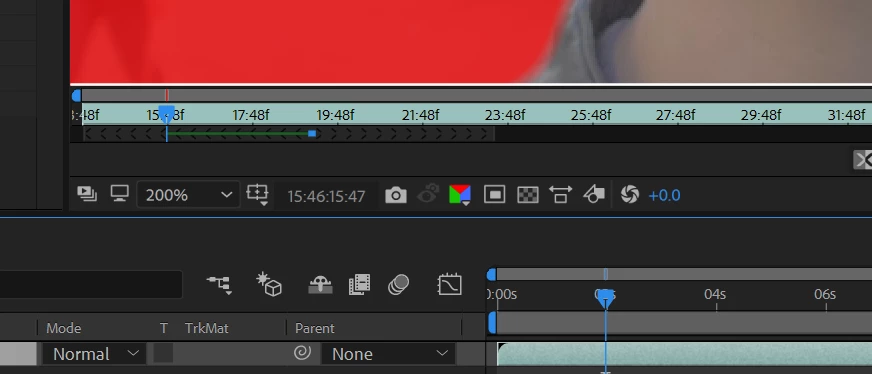
The green line represents where the 'tracking' is already applied and rendered ?

Scrubbing through the timeline is extremely slow, just displaying one frame takes like 10 seconds and it's all freezing up.

At one frame I actually got the mask the way I want it.. how do I now apply it to the whole sequence ?
    This topic has been closed for replies.

    1 reply

    Roland Kahlenberg
    Legend
    April 14, 2018

    This looks like the RotoBrush tool. What actually are you doing? Which tool/effects have you applied?

    Provide screen grabs of your Effects Control Panel (ECP) and Layer Panel, if it's the Rotobrush Tool that you've used.

    More info on the RotoBrush Tool. Roto Brush and Refine Matte in After Effects

    If you've watched youtube videos and aim to use them as references, for technical information then you've wasted your time. More than 90% of youtube tutorializers not only know very little, they have a harder time explaining the tools they use. In short, they're just showing you procedures but not how to think or why you're performing each step, of the procedure. These folks are great for the creative ways that they use AE and that is what you should look for when watching 'their' tutorials. Don't confuse yourself between creative brilliance and technical excellence - they are quite different. To be good in AE, you first need to have a good foundation. Books and paid lessons, either in a classroom or via LinkedIn Learning/Lynda are your best bets to get a solid foundation in AE.

    Very Advanced After Effects Training | Adaptive & Responsive Toolkits | Intelligent Design Assets (IDAs) | MoGraph Design System DEV
    Michal S.Author
    Inspiring
    April 14, 2018

    yes, exactly as you say..

    I've got two separate videos.. A and B let's say.

    Trying to isolate the guy on video B from the background and place him onto video A.

    I managed to get one frame perfect already and then pressed on the Freeze button, thinking it would analyze all the frames and apply the same settings.. but it just froze up and now I can't find the frame where the roto brush was correct..

    What are the fundamental steps on getting the roto brush (i.e. mask) drawn and actually applied to the whole sequence ?

    Here's the effect control panel.. but I don't think it's any beneficial in this case..

    Roland Kahlenberg
    Legend
    April 14, 2018

    Disable Lumetri Color effect — re-enable it only after you are convinced RotoBrush has done its job and you have applied the Freeze option for the RotoBrush Tool. Lumetri Color or any other effect will just slow down RotoBrush and it isn't required at this stage.

    I've given you the link to the documentation for the RotoBrush Tool - use it. It's nothing too difficult to understand.

    Here are a few QuickTips -

    1) RotoBrush does not work well on all footage types. The edges you want to work on must have sufficient color/luma differentiation. The RotoBrush automates the creation of a matte BUT you have to go through each frame to make adjustments, manually. These manual adjustments you make are supposed to help the tool make automated guesses in later/earlier frames.

    2) RotoBrush creates a Base Frame and Span each time you click in the Layer Panel's Timeline. Each Span defaults to 20 frames. You can shorten or lengthen a Span by dragging its in/out edge. You should think of a BaseFrame as a keyframe for RotoBrush. Hence, create a new BaseFrame only if the edge/object you are RotoBrushing has a distinct change due to color or movement.

    3) After applying a Base Frame, you are to move forward (or backward; depending on when in time you created the Base Frame) and clean up the edges — you are to clean up each frame. Each frame you traverse will marked with a green bar; much like the main Timeline's cached area.

    4) Once you have completed RotoBrushing the entire clip, double check the edges. To finalize the RotoBrush edges, click on the Freeze button.

    Very Advanced After Effects Training | Adaptive & Responsive Toolkits | Intelligent Design Assets (IDAs) | MoGraph Design System DEV