


Participant
Sep 13, 2022 4:19 PM UTC
Answered

remove non-compatible plugins (AEJuice)

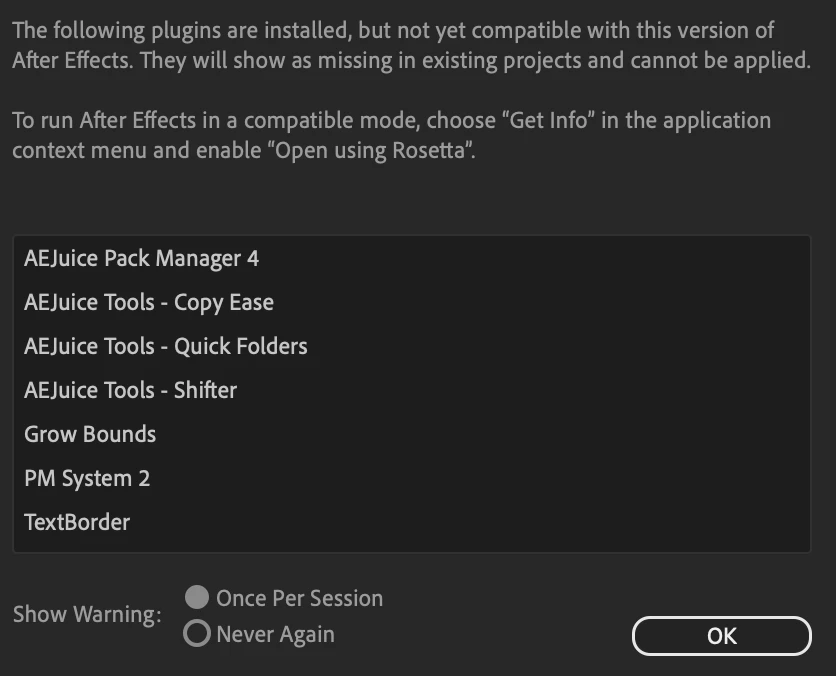
Every time I launch AE, I get a warning of plugins that are not compatible with my version of After Effects. I've searched and removed every single instance of AEJuice on my computer, but it's still mentioned in the pop-up when AE launches. Is there a way to purge AEJuice from my system or get AE to ignore it? I'm concerned it my be causing issues as AE has started to crash when opening certain project files. 
 

JohnColombo17100380
JohnColombo17100380Correct answer
Community Manager
Sep 13, 2022 10:07 PM UTC

Hi @Matt23080645y23p,

Make sure you also check the Library folder at the root of your hard drive; the one in your screenshot is the user-level Library folder. In a Finder window, hit ⌘+⇧+G, then paste this path: /Library/Application Support/Adobe/Common/Plug-ins/7.0/MediaCore.


- John, After Effects Engineering Team 


7 replies

JohnColombo17100380
Community Manager
Community Manager
Sep 13, 2022 8:01 PM UTC

Hi @Matt23080645y23p,

After Effects looks for installed plug-ins in these locations on Mac:

  • /Applications/Adobe After Effects 2022/Plug-ins
  • /Library/Application Support/Adobe/Common/Plug-ins/7.0/MediaCore
  • ~/Library/Application Support/Adobe/Common/Plug-ins/7.0/MediaCore ( this is the user-level location )

Check those locations to see if the AE Juicers plug-ins are still there and let us know if they continue to show up in the dialog.


If After Effects is crashing, please make sure to submit your email and a message about what you were doing went the crash occurred ( opening a project, working the Timeline, closing the app, etc ).


Thanks for reporting this issue and for any further information you can provide, 

- John, After Effects Engineering Team 


Translate
Participant
Sep 13, 2022 8:16 PM UTC

 Thanks, John - I've removed everything from the After Effects 2022 folder. I don't see that MediaCore folder anywhere along that file path, and searching for "MediaCore" doesn't show any results. I trashed the AE Preferences and rebuilt default prefs, but the error still occurs. 

Translate
JohnColombo17100380
Community Manager
JohnColombo17100380Community ManagerCorrect answer
Community Manager
Sep 13, 2022 10:07 PM UTC

Hi @Matt23080645y23p,

Make sure you also check the Library folder at the root of your hard drive; the one in your screenshot is the user-level Library folder. In a Finder window, hit ⌘+⇧+G, then paste this path: /Library/Application Support/Adobe/Common/Plug-ins/7.0/MediaCore.


- John, After Effects Engineering Team 


Translate
Mylenium
Legend
Sep 13, 2022 6:01 PM UTC

Where have you looked? The standard AE plug-in folder? The Media Core folder? Your user documents folder? You need to be more specific and also provide some system information.


Mylenium 

Translate
Participant
Sep 13, 2022 6:08 PM UTC

I'm on an M1 Max Macbook pro

I've deleted everything related to AEJuice specifically I found in my plug-in folder and even ran their "uninstaller." I'm not 100% certain where else I've deleted it from, because I just searched for "AEJuice" in Finder and deleted everything I found, but there were a couple other instances. 

Translate
