Tomas Sinkunas
Legend
October 21, 2015
Answered

remove selected properties from ShapeLayer

  • October 21, 2015
  • 4 replies
  • 1616 views

This seems so simple, but I cannot figure this out.

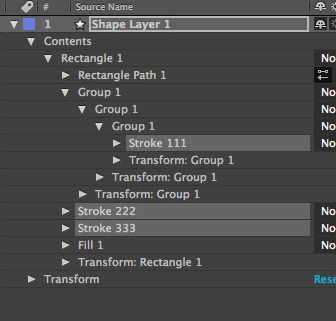
I have selected Stroke and Fill under ShapeLayer. And I want to remove them from this layer.

    var myLayer = myComp.selectedLayers[0];

    var propertyCollection = myLayer.selectedProperties;

    for (var j = propertyCollection.length-1; j >= 0; j --) {

        propertyCollection.remove()

    }

However, on second iteration AE gives me error "Object is invalid". Am I missing something?

P.S. How do I paste code here so it looks like a code, and not a text?

This topic has been closed for replies.
Correct answer UQg

UQg‌ your code seems very complicated:)

It seems to work just fine if selected properties are in the same group, however, it still breaks once removing selected properties from different groups.

doIt();

function doIt(){

    var myComp = app.project.activeItem;

    var myLayer = myComp.selectedLayers[0];

    var propertyCollection = myLayer.selectedProperties;

    removeSelectedProperties(propertyCollection)

}

function getSelectedRemovableAncestor(p){ 

    p=p.parentProperty; 

    while(p && p.parentProperty && (!p.selected || p.parentProperty.propertyType===PropertyType.NAMED_GROUP)) p=p.parentProperty; 

    return p && p.propertyDepth>=2 ? p : null; 

    }; 


function removeSelectedProperties(props){ 

    // Assumes that props is an array sorted in a similar fashion as theLayer/theComp.selectedProperties 

    // Wont work for an arbitrary array of properties (pre-sorting required) 

    var N=props.length, n; 

    var last, parent, temp, indices; 

    var siblingsToRemove = []; 


    app.beginUndoGroup("Remove"); 

    while(N>0){ 

        // skip children of named groups, they cant be removed individually 

        while( (last=props[--N]) && last.parentProperty.propertyType !== PropertyType.INDEXED_GROUP); 


        if (!last) break; 


        // last is the child of an indexed group 

        // see if last has a selected removable parent, in which case, jump to that parent; (can only happen in shapes/text animators/trackers) 

        while(temp = getSelectedRemovableAncestor(last)){ 

            last=temp.parentProperty(temp.propertyIndex); 

            // check the new index of last in the props array; 

            while (props[--N]!=last); 

            }; 

        // last and the selected children of its parent can be removed: 

        parent = last.parentProperty; 

        indices = [last.propertyIndex]; 

        while(N>0 && props[N-1].parentProperty == parent) indices.push(props[--N].propertyIndex); 

        // normally, indices is already sorted in descending order, eg [10,8,6,2,1] 

        // indices.sort(function(a,b){return b-a;}); 

        siblingsToRemove.push({parent: parent, indices:indices}); 

        }; 

    for (n=0; n<siblingsToRemove.length; n++){ 

        parent = siblingsToRemove.parent; 

        indices = siblingsToRemove.indices; 

        for (i=0; i<indices.length; i++) parent.property(indices).remove(); 

        }; 

    app.endUndoGroup(); 

    return; 

}; 


Indeed! I wont try correcting it, but this one should work (hopefully!!!!!!)

function doIt(){

    var myComp = app.project.activeItem; if(!myComp || myComp.typeName !== "Composition") return;

     var myLayer = myComp.selectedLayers[0];

     var propertyCollection = myLayer.selectedProperties;

     removeSelectedProperties2(propertyCollection, function(p){return p.matchName === "ADBE Vector Graphic - Fill" || p.matchName === "ADBE Vector Graphic - Stroke";});

    };

function getIndexPath(p){

    var ret = [];

    while(p){ret.unshift(p.propertyDepth<1 ? p.index : p.propertyIndex); p=p.parentProperty;};

    return ret;

    };

function getPropFromIndexPath(comp, indexPath){

    var p, i;

    if (indexPath[0]>comp.numLayers) return null;

    p = comp.layer(indexPath[0]);

    for (i=1; i<indexPath.length; i++){

        if (indexPath<=p.numProperties){

            p=p.property(indexPath);

            }

        else{

            p=null;

            break;

            };

        };

    return p;

    };

function removeSelectedProperties2(props, isWhatIWantToRemove){

    // isWhatIWantToRemove: function to filter things that should be removed and discard others

    var DO_FILTER = typeof isWhatIWantToRemove === 'function';

    var N=props.length, n;

    var temp = [];

    if (N<1) return;

    var comp = props[0].propertyGroup(props[0].propertyDepth).containingComp;

    for (n=0; n<N; n++){

        if (DO_FILTER && !isWhatIWantToRemove(props)) continue;

        temp.push(getIndexPath(props));

        };

    // normally the entries of temp should be sorted lexicographically, but it should be already the case for selectedProperties of a comp or layer

    app.beginUndoGroup("remove 2");

    for (n=temp.length-1; n>=0; n--){

        p = getPropFromIndexPath(comp, temp);

        if (p) try{p.remove();}catch(e){};

        };

    app.endUndoGroup();

    return;

    };
4 replies

zlovatt
Inspiring
October 21, 2015

This will work. Already sent to Tomas directly, but posting here for future ref.

var thisComp = app.project.activeItem;

var thisLayer = thisComp.selectedLayers[0];

var shapeGroupCollection = thisLayer.property(2);

var shapeGroupIndexArray = [];

for (var i = 1; i <= shapeGroupCollection.numProperties; i++) {

    if (shapeGroupCollection.property(i).matchName == "ADBE Vector Graphic - Fill") {

        shapeGroupIndexArray.push(i);

    }

}

for (var i = shapeGroupIndexArray.length-1; i >= 0; i--) {

    alert(i +":" + shapeGroupIndexArray);

    shapeGroupCollection.property(shapeGroupIndexArray).remove();

}

Tomas Sinkunas
Legend
October 21, 2015

Thanks UQg‌ and @Mathias ,

However, I am not sure how to go about "sort the selected properties by propertyDepth, then by propertyIndex"

if (Object.isValid(propertyCollection) propertyCollection.remove();    <--- always returns false after first itteration.


Also, once first iteration is over, the visual selection of properties is gone. maybe that's the case?


I thought that this solution to remove selected properties will be a walk in the park, but now it's becoming countless hours of investigating why it's not working. Please, if you have a logical solution for this, please help.

    var myLayer = myComp.selectedLayers[0];

    var propertyCollection = myLayer.selectedProperties;

    for (var j = propertyCollection.length-1; j >= 0; j --) {

        propertyCollection.remove()

    }

UQg
Legend
October 21, 2015

Indeed, the second suggestion i made was bad, and the first one wouldnt have worked either, because each of these arrays entries are expllcit references to properties;

I think you have to store indices and refer to them by theParent.property(indices).

If the tree of selected properties is complex you'd have to stores all thepaths i think.

Mathias Moehl
Community Expert
Community Expert
October 21, 2015

Hmm, I am not sure which of the following two things actually happens:

1) by removing a property, the selection changes and hence the array representing the selection (to which you store a reference in your variable propertyCollection) changes.

2) by removing a property, the actual references to all the other properties invalidate

If the problem is 1), maybe it makes a difference if you use

var propertyCollection = myLayer.selectedProperties.slice();  // make a true copy of the array instead of just a reference

By the way, to format your code in the forum, first switch to the advanced editor and then use the syntax highlighting that is hiding behind the >> icon.

Mathias Möhl - Developer of tools like BeatEdit and Automation Blocks for Premiere Pro and After Effects
UQg
Legend
October 21, 2015

One way would be to sort the selected properties by propertyDepth, then by propertyIndex

Another (simpler) is to check that the object is still valid : if (Object.isValid(propertyCollection) propertyCollection.remove();

(else it's gone already as a child of something that has been removed).

You have to click the Use Advanced Editor top right of "write box" (whatever this is called), then click the "inset" double arrow in the new toolbar, then synthax highlighting etc.

Xavier.