ovis90
Participant
September 8, 2018
Answered

removing background on video clip with roto brush

  • September 8, 2018
  • 2 replies
  • 19132 views

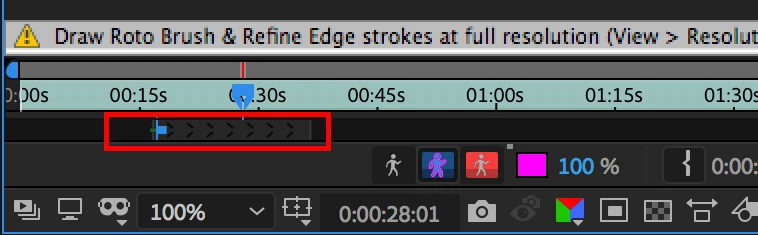
So i am new to Adobe After efects. I was trying to remove background with roto brush it seems it removes only one second and I Need to remove at least 1minute. Or then I need to select the object all over again with roto brush. It will take whole day to just remove background for 1 minute clip. How do I remove background for whole clip and not just every time for one second.? Please help
This topic has been closed for replies.
Correct answer OussK

Roto brush must track your footage when you click space or play, please check this tutorial about how to use roto brush.

so you don't need to re-select the object you want to remove.

Alos try to expand the rang and direction for automatic propagation.

2 replies

Mylenium
Legend
September 8, 2018

aside from the suggestion of actualyl learning how this stuff works, simply get used to it. Manual roto simply is laborious and tedious and can indeed take a lot of time when done right.

Mylenium

OussK
Community Expert
OussKCommunity ExpertCorrect answer
Community Expert
September 8, 2018

Roto brush must track your footage when you click space or play, please check this tutorial about how to use roto brush.

so you don't need to re-select the object you want to remove.

Alos try to expand the rang and direction for automatic propagation.