Inspiring
October 14, 2017
Answered

Render at Millions, Reads as Trillions. What gives?

  • October 14, 2017
  • 1 reply
  • 2181 views

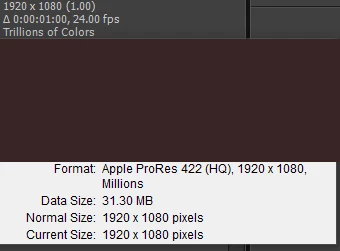
Spec sheets for a number of clients my team is creating content for require ProRes 422 renders at 8bpc and millions of colors. Our comps have been set-up with the correct specs and our output modules reflect the spec sheets exactly. However, during our QA process, when bringing our MOVs back into AE to inspect their settings, the project window shows them as having Trillions of Colors.

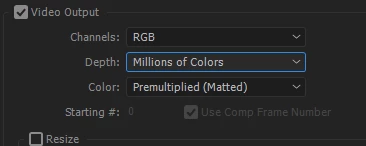
These renders have no alpha channel (422 doesn't support it anyway), the settings have been triple checked to ensure project depth is set to 8bpc and the Output module settings have Millions of Colors specified in depth. We're worried that the client may use the same method to check the files and kick them back for being off-spec so I'm asking around to see if there's something we're doing incorrectly, a step we're missing or if this is some sort of bug in AE.

My only relief in all this is that when I check the movie inspector in Quicktime, I do indeed see Millions of Colors.
This topic has been closed for replies.
Correct answer Rick Gerard

Prorez is a 10 bit codec, no matter what bit depth you send to it. ProRez 444 can support up to 12-bit color and 16-bit color. I think that AE is just doing it's best to tell you that if you want to you can have up to trillions of colors. If you rendered an8-bit comp to Pro Rez then there are only 256 different possible color values for the red, green blue and alpha channels. Actually, Prorez does not use RGB either but that is the limit on how many discrete colors you can sample if a native ProRez file is placed in an 8-bit project. My QT movie inspector doesn't show video bit rate:

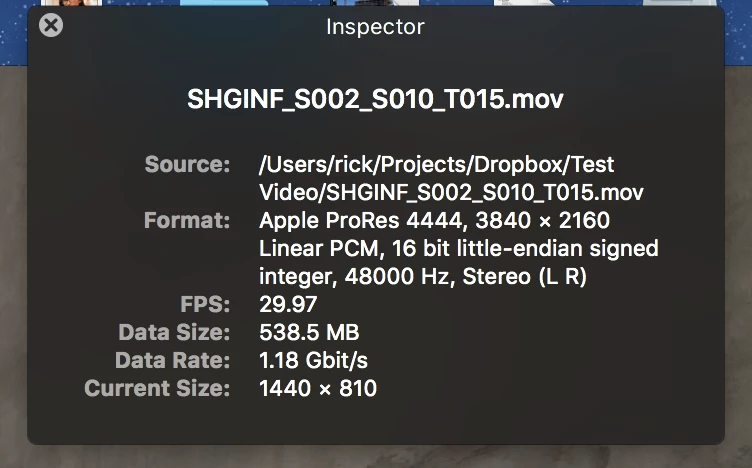
You don't have to nor have I ever seen any way to set the bit depth of a render to ProRez. The inspector shows about a  3 second a test render I just did in AE to show color correction to my director so he can try some other looks. I lost two of the audio tracks in the original but that is a known limitation when rendering in AE.

Here is the official white paper: Apple ProRes

1 reply

Rick GerardCommunity ExpertCorrect answer
Community Expert
October 14, 2017

Prorez is a 10 bit codec, no matter what bit depth you send to it. ProRez 444 can support up to 12-bit color and 16-bit color. I think that AE is just doing it's best to tell you that if you want to you can have up to trillions of colors. If you rendered an8-bit comp to Pro Rez then there are only 256 different possible color values for the red, green blue and alpha channels. Actually, Prorez does not use RGB either but that is the limit on how many discrete colors you can sample if a native ProRez file is placed in an 8-bit project. My QT movie inspector doesn't show video bit rate:

You don't have to nor have I ever seen any way to set the bit depth of a render to ProRez. The inspector shows about a  3 second a test render I just did in AE to show color correction to my director so he can try some other looks. I lost two of the audio tracks in the original but that is a known limitation when rendering in AE.

Here is the official white paper: Apple ProRes

ck_jediAuthor
Inspiring
October 15, 2017

Thanks. Some additional reading on what bit depth actually is cleared things up for me further.  10 bit color depth means that you can get 1024 shades of each color. 1024Rx1024Gx1024B = over a billion.

So, ProRes (which technically doesn't even use RGB, but Y’, CB, and CR, as you mentioned) being the 10bit codec that it is, will always output to this billions. I'm assuming that when AE reads the file in, it rounds up to the generic "trillions of colors" readout, whereas Quicktime just doesn't know any better and defaults to saying "millions."

References:

https://images.apple.com/final-cut-pro/docs/Apple_ProRes_White_Paper.pdf

https://www.techhive.com/article/171223/10_bit_color.html