Participant
March 13, 2018
Answered

Render fails, no error message

  • March 13, 2018
  • 1 reply
  • 724 views

I'm having an issue rendering a project. The whole project is only 8 seconds long.

There is no message error that comes up, I just hear that annoying sheep sound. It does say "Failed 00;06;02" every time. At 06;02, I used the Warp effect but I made sure the motion tile is at 200. Usually when it's an error with the Warp effect, an error message pops up and tells me that.

Here are my render settings:
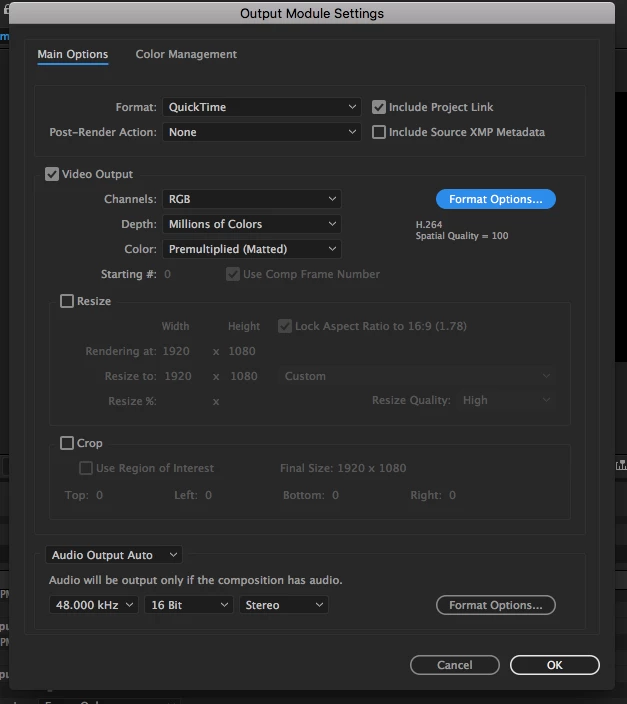
I like to use H.264 because I've noticed it really improves the quality.

I only have 8 GB of memory. I know, not a lot, but for the most part, my videos always render without issue.

I'm using an external hard drive with 1 TB.

The whole project is only 8 seconds long and there aren't any more effects than I usually use. I used the Twitch plugin and I've heard that that can be the issue, but everytime I've used Twitch in the past, it's rendered correctly.  Also, everytime I try prerending it fails too.

(Mac OS 10.13.1, AE CC 2017, 8 GB RAM)

If you know anything about this, please let me know!

This topic has been closed for replies.
Correct answer Rick Gerard

You should not be using H.264 Quicktime because Apple is no longer supporting it, it never worked as it should have in a Quicktime container, and it is buggy as can be.

If your render always fails at the same point the first place you should look is in the composition. Go to that time, select all layers, press the U key twice to see everything that you have modified on those layers then start turning things off or resetting values until you get the render to keep going.

Now, when you render, use the Adobe Media Encoder to render an h.264 MP4, which is the standard for web distribution and use one of the presets that matches your delivery system. Until you have a really good understanding of compression and formats you should never see the word Custom in a render setting. It is easier to foul things up than it is to make them better.

If you really want to use the Render Cue to render then render to one of the presets, then load the rendered file in the Adobe Media Encoder to render your deliverable.

1 reply

Rick GerardCommunity ExpertCorrect answer
Community Expert
March 14, 2018

You should not be using H.264 Quicktime because Apple is no longer supporting it, it never worked as it should have in a Quicktime container, and it is buggy as can be.

If your render always fails at the same point the first place you should look is in the composition. Go to that time, select all layers, press the U key twice to see everything that you have modified on those layers then start turning things off or resetting values until you get the render to keep going.

Now, when you render, use the Adobe Media Encoder to render an h.264 MP4, which is the standard for web distribution and use one of the presets that matches your delivery system. Until you have a really good understanding of compression and formats you should never see the word Custom in a render setting. It is easier to foul things up than it is to make them better.

If you really want to use the Render Cue to render then render to one of the presets, then load the rendered file in the Adobe Media Encoder to render your deliverable.