
Participant
December 26, 2018
Answered

Rendering Compressed

  • December 26, 2018
  • 1 reply
  • 464 views

When I try and render in After Effects, it shows up compressed into my files. I use AVI (+have tried other formats), but when I render the composition size is sort of put into a rectangle. It kind of looks like it was squeezed into a 4:3 size and I don't know how to fix it. My original composition was 640x1080 and I have a frame rate of 59.94. I tried using quicktime but it still rendered the same and the H.264 won't show up (I use windows)
    This topic has been closed for replies.
    Correct answer imeilfx

    I'm not sure what do you mean by saying "compressed" - do you  mean squeezed on width or height?
    If that is the case you have to:
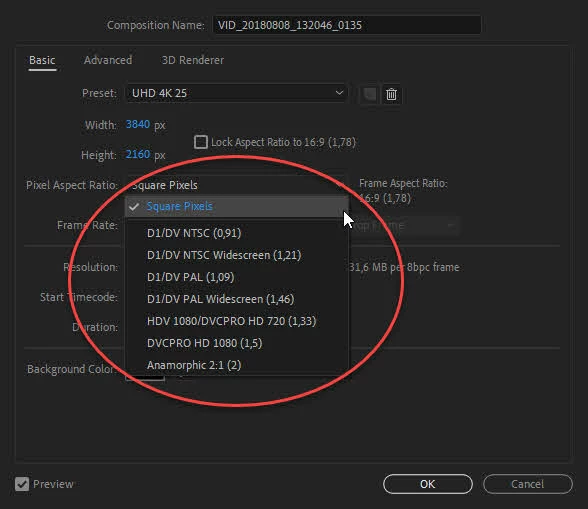
    a) check if you use square pixels in your composition (in most cases it is good to use those)

    b) if you use square pixels and you have aspect ratio)resoution as you 've said - check if you use codec/codec settings that forced some fixed aspect ratio for output (if you do that is why you get distorted video clip
    c) if you use codec that does not distort/force fixed resolution - check if your media payer play video in aspect that was rendered in or it fits to screen that you have

    And I guess (by reading your post) that you use Render Queue for your h264 final file. If that is the case - you should use Adobe media Encoder render queue instead.
    More on how to render from AE you will find here: Basics of rendering and exporting in After Effects CC 

    1 reply

    imeilfx
    imeilfxCorrect answer
    Inspiring
    December 26, 2018

    I'm not sure what do you mean by saying "compressed" - do you  mean squeezed on width or height?
    If that is the case you have to:
    a) check if you use square pixels in your composition (in most cases it is good to use those)

    b) if you use square pixels and you have aspect ratio)resoution as you 've said - check if you use codec/codec settings that forced some fixed aspect ratio for output (if you do that is why you get distorted video clip
    c) if you use codec that does not distort/force fixed resolution - check if your media payer play video in aspect that was rendered in or it fits to screen that you have

    And I guess (by reading your post) that you use Render Queue for your h264 final file. If that is the case - you should use Adobe media Encoder render queue instead.
    More on how to render from AE you will find here: Basics of rendering and exporting in After Effects CC