
Participant
December 25, 2019
Answered

Rendering H.264 with 2 consecutive B frames

  • December 25, 2019
  • 2 replies
  • 8651 views

Hello,


I want to render an H.264 project for youtube.


YouTube recommends "2 consecutive B frames" in the exports.
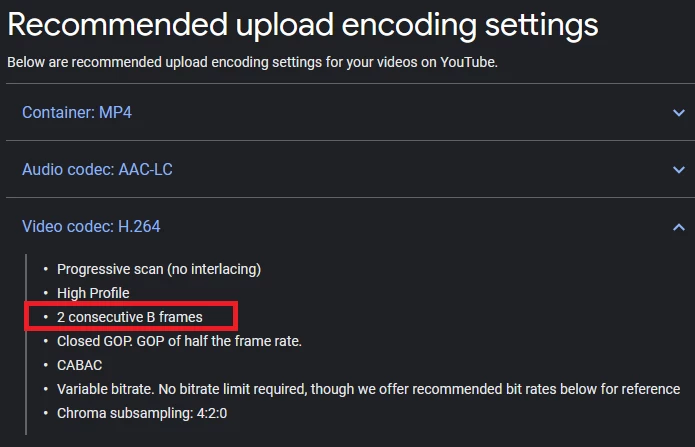


my project is 60fps so what setting i need to type in the "keyframe distance" to get this 2 consecutive B frames?

This topic has been closed for replies.
Correct answer Dave_LaRonde

Well, this is pretty easy. Open Adobe Media Encoder. There's a command to open an AE comp. Navigate to the project file, pick the right comp, and then use the YouTube compression preset. Hit the start button. AME takes care of it for you. 

2 replies

Community Expert
December 26, 2019

Dave hit the nail on the head. Until you completely understand video compression and video formats you really have no business messing with the presets. They are all set up and they will give you the best results almost all projects. It's pretty hard to improve on anything.

Participant
December 26, 2019

I understand tha you believe that the YT preset is using the correct "keyframe distance" value to output

2 consecutive B frames. I would like to learn more about it and want know how to calculate it.

Community Expert
December 26, 2019

You need to check the official documentation to study up on h.264 specifications. Do not rely on amateurs and enthusiasts to give you advice. Most of the encoding advice on the net is just plain wrong. You have to vet the sources to make sure they know what they are talking about. 


The AME Help will take you to the User Guide. That's where you learn how to manipulate the controls and what they do. The AME is setup for standard distribution and rendering of video and things like setting up the IBP frames are hidden because there are standards that must be followed if the video is going to be viewable on standard devices and delivery systems. 


Specialized encoders are required for things like big LED displays and multi-screen presentation systems. If you have to produce specialized media you need specialized encoders. The AME is not designed or intended for that kind of work because each specialized system has its own requirements and it is not a good idea to give the average user access to controls that will screw up the render.


Dave_LaRonde
Dave_LaRondeCorrect answer
Inspiring
December 26, 2019

Well, this is pretty easy. Open Adobe Media Encoder. There's a command to open an AE comp. Navigate to the project file, pick the right comp, and then use the YouTube compression preset. Hit the start button. AME takes care of it for you. 

Participant
December 26, 2019

I understand tha you believe that the YT preset is using the correct "keyframe distance" value to output

2 consecutive B frames. I would like to learn more about it and want know how to calculate it.