
Participant
November 1, 2018
Question

Repeated Crash during Tutorial "Learn the Basics" Adding a Blur Effect

  • November 1, 2018
  • 2 replies
  • 969 views

I am a complete newbie to After Effects... So I'm doing the tutorials. Didn't get very far before hitting this problem that I cannot seem to get past.

In the "Add a Visual Effect" tutorial, #4 of 5 in "Learn the Basics," I have been following the steps exactly, but the same thing is happening every time in step 2/8: After I add the Fast Box Blur effect to the Summer_Forest.mp4 layer, then change the Blur Radius property to 25 in the effect settings, hitting the tutorial window's "NEXT" button immediately crashes the app, which displays the following error messages in two consecutive pop-up alerts as it dies:

"After Effect error: internal verification failure, sorry! {no current context}"

"After Effects can't continue: very unexpected uncaught exception while application running"
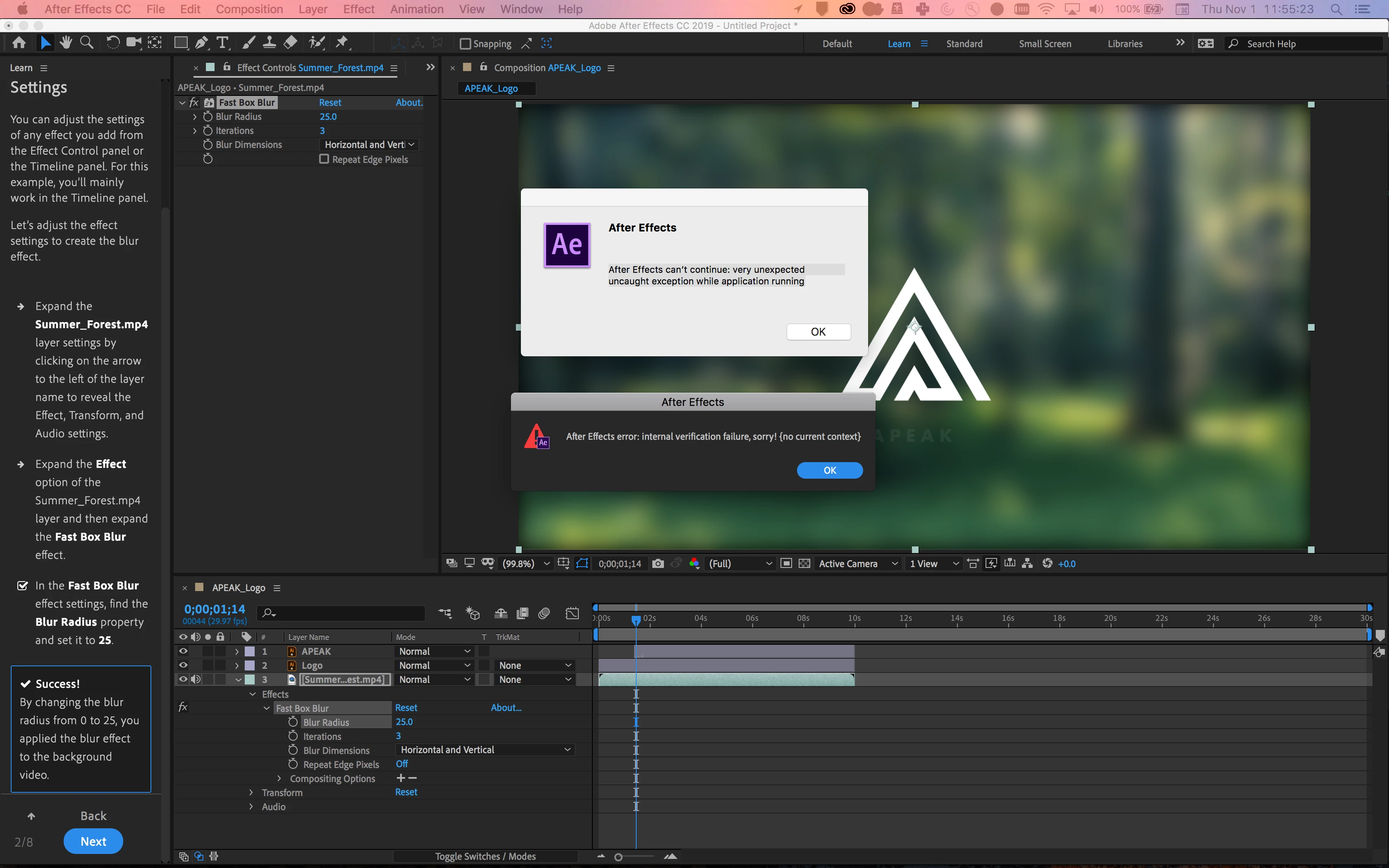
What am I supposed to do here? "Very unexpected," indeed.

This topic has been closed for replies.

2 replies

P.M.B
Legend
January 4, 2019

billyzduke  wrote

hitting the tutorial window's "NEXT" button immediately crashes the app

You're saying the hitting the "next" button on the website window is crashing After Effects? 

EDIT:  I just watched the tutorial.  There is no "next" button.  Please be specific about what's happening so someone can help you.

Also provide system specs, AE version etc.

FAQ: What information should I provide when asking a question on this forum?

~Gutterfish
Participant
July 18, 2019

I am having the same problem, at the same point in the tutorial.

I'm sorry, I don't understand the "web site window" question. This is a tutorial inside After Effects — it's the one you get to from the Home window: "Let's show you around. Get started with quick tutorials in the Learn panel," with the "Start First Tutorial" button.

As billyzduke said, there's a "Next" button at the bottom of the Learn panel:

But then, the OP already posted a screenshot showing the Next button. What else can I do to get past your skepticism?

After Effects 16.1.2 (Build 55)

macOS 10.13.6

MacBookPro11,3 with 16GB RAM, dual graphics (Intel Iris Pro, Nvidia GT 750M) with discrete GPU active, 512GB storage (117GB free)

This is the third or fourth crash I've had with the tutorial. Some occurred slightly earlier, but I can't point to where.

Martin_Ritter
Legend
July 18, 2019

Reach out to Adobe stuff - let them see the mess they've created. *rolling-eyes*

Do others in app tutorials work?

*Martin

Participant
January 3, 2019

I was having the exact same problem. I ended up just finding beginner tutorials/walkthroughs of After Effects on YouTube and following along with them instead. The tutorials from YouTube include similar steps that the in app AE tutorials want you to do. My conclusion is that there is some type of bug within the app tutorial.

Roland Kahlenberg
Legend
January 4, 2019

Please ensure that both of you send in a Bug Report.

Very Advanced After Effects Training | Adaptive & Responsive Toolkits | Intelligent Design Assets (IDAs) | MoGraph Design System DEV