
Replace a composition with one from another file
Someone created some AE files for me. I opened that project in AE and adjusted some compositions to my liking. Now he sent me an updates version of one of the existing compositions. I want to import this updated version into my existing AE projects, so that I can keep it together with the other compositions that I've already modified in one file. I figured out how to import a composition and it works. But I would like to replace all the files, controls, etc this new file depends on for the old ones, because they should be the same and I want to avoid gathering unnecessary duplicate files in my project.
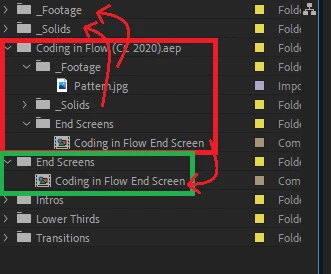
I hope the image makes my problem more clear. The End Screen in the red box is supposed to replace the End Screen in the green box, but I would like to link it to the existing _Footage and _Solids folders and delete the newly imported ones (everything in the red box). Is that possible?
 AdChoices