Participant
September 10, 2020
Question

Replace a set of images with one of the layers

  • September 10, 2020
  • 1 reply
  • 341 views

Hi guys, 


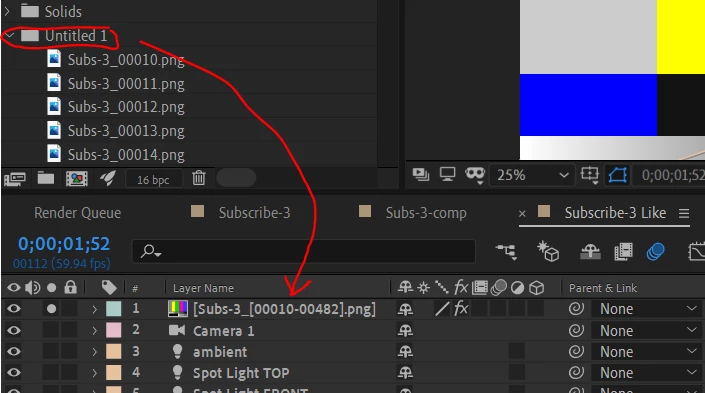
Can you please let me know how to replace a set of images with a layer ? So basically, I have a batch of images in a folder named Untitled 1 and I am trying to replace within a layer Subs-3 (shown in image). I have tried to click Alt and drag them but they are not replaced properly. 


Thank you
 

This topic has been closed for replies.

1 reply

Mathias Moehl
Community Expert
Community Expert
September 10, 2020

You need to

1. first select the layer in the comp whose footage you want to replace and then

2. alt-click & drag the item from the project window onto the layer.

Maybe you forgot step 1?

Mathias Möhl - Developer of tools like BeatEdit and Automation Blocks for Premiere Pro and After Effects
Participant
September 10, 2020

It doesn't work unfortunately. I try to select all the images as you noticed, there are a lot of images. It doesn't give me the option to replace it.

Mathias Moehl
Community Expert
Community Expert
September 10, 2020

Oh, I see. You made a mistake when actually importing the images in the project.

When you import the png images, make sure to just select the first image and enable the chechbox to import an image sequence. That way only a single item will be added to your project and it will contain the entire image sequence.


Mathias Möhl - Developer of tools like BeatEdit and Automation Blocks for Premiere Pro and After Effects