
Known Participant
February 1, 2023
Answered

Replace footage and import imports multiple files

  • February 1, 2023
  • 2 replies
  • 1322 views

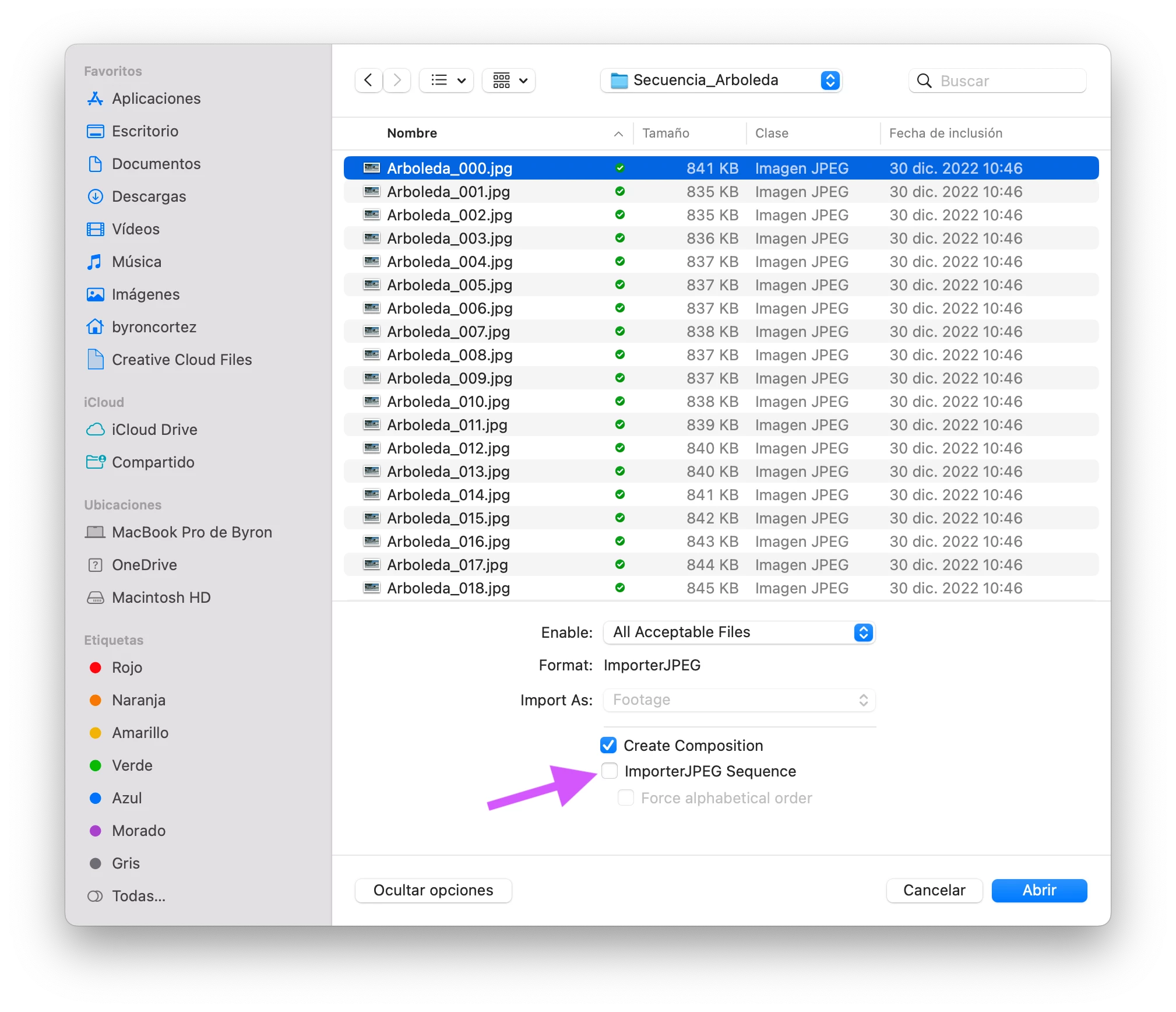
I tried to use Replace Footage to replace a jpeg image in a project. When I do, it imports multiple jpegs from the same folder as footage. I then tried to just import it into the project, and the same thing happens. I can drag those files from the folder into the AE project with no problem, but something is happening with importing/replacing I do not get. I am hoping it's something simple I have overlooked but haven't found it yet nor any references to that here. Advice?
This topic has been closed for replies.
Correct answer Byron Cortez

Uncheck this checkbox when you import image sequences.

2 replies

Byron CortezCommunity ExpertCorrect answer
Community Expert
February 2, 2023

Uncheck this checkbox when you import image sequences.

Byron.
Known Participant
February 2, 2023

Thank you both. That was it, though I'm now left wondering how that got selected all of a sudden because I did not do it intentionally nor have I fiddled with import settings at all. The software nymphs I guess.

Mylenium
Legend
February 2, 2023

Turn off the "Sequence" option in the import dialog.


Mylenium