
Participating Frequently
November 18, 2021
Answered

Resize a layer

  • November 18, 2021
  • 2 replies
  • 424 views

Hey guys ! 


I'm pretty new to adobe after effect. I'm designing a lot on adobe illustrator and I'm trying to animate a logo. So I imported my illustrator file on after effect (each object is in a different layer in my illustrator file). 

The issue that I'm having is that the "size" of the layer in after effect is way larger than my objet inside and it's pretty annoying to work on it (see screenshot). I would like that the selection correspond to the size of the object but it seems that I only resize a composition and not a layer. 

If someone can help me, i would be super grateful ^^

Thanx
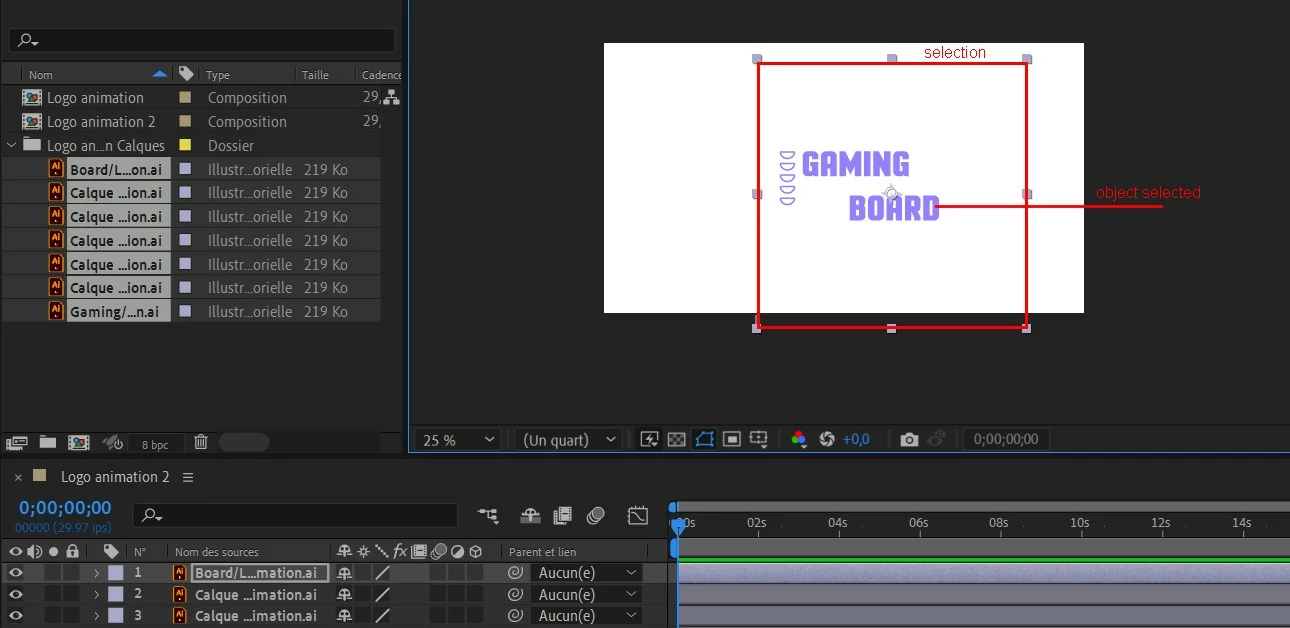
 

This topic has been closed for replies.
Correct answer nishu_kush

Hi defaultoude8g6wdtc2,


Thanks for writing in.

As Mylenium suggested, at the time of importing the Illustrator file, select "Layer Size" instead of "Document Size" under the Footage Dimensions drop down.

Hope it helps.


Thanks,

Nishu

2 replies

nishu_kush
nishu_kushCorrect answer
Legend
November 18, 2021

Hi defaultoude8g6wdtc2,


Thanks for writing in.

As Mylenium suggested, at the time of importing the Illustrator file, select "Layer Size" instead of "Document Size" under the Footage Dimensions drop down.

Hope it helps.


Thanks,

Nishu

Participating Frequently
November 19, 2021

Thanks for the answer !

Mylenium
Legend
November 18, 2021

I suggest you read up on the various import options in the online help. What you see is perfectly normal when you choose "document size" as the criteria rather than "layer size". Again, I strongly recommend you actually read the help. Many of these finer points and quirks in AE can't be understood intuitively.


After Effects User Guide


Mylenium

Participating Frequently
November 19, 2021

Hey ! Thanks, I finally found it before reading you but it was the good answer 😉