


Inspiring
July 1, 2026
Question

RGB/Hex in ACEScg

  • July 1, 2026
  • 2 replies
  • 72 views

Has anyone figured this out yet? I am in ACEScg, I have to use a brand colour given to me by a client. R255 G79 B64 #FF4F40

This is supposed to be the method to make it work. It doesn’t.
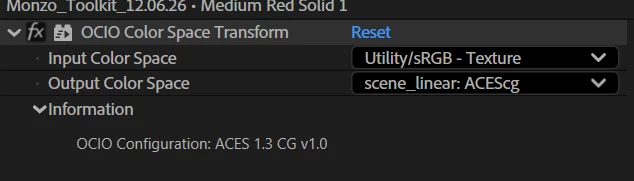
 

Why is there not a simple solution for this? Maxon made it happen in C4D. The maths must convert somehow, but how?

    2 replies

    Inspiring
    July 2, 2026

    Nothing? A whole community of After Effects users and no one knows how to use an RGB or hex value in an ACEScg project? 

    How is anyone supposed to work on a branded project if we can’t have accurate brand colours??

    As far as I can tell, ACES is adding some kind of curve (to mimic film or something) - someone somewhere must know how to appy the inverse of this curve?

    Inspiring
    July 1, 2026

    Update.

    When using an Adobe Color Managed Color Engine and ACEScg working space, the above method (using colour profile converter) works. When using an OCIO color managed engine, it doesn’t. If both Working Colour spaces are supposed to be ACEScg, why am I seeing vastly different results? Something stinks.

    Community Manager
    July 20, 2026

    Hey Chris,

    I read your post and pointed it to the Color team working on AE and Premiere. They asked if you could provide a project file, sample media, and your exact observation, they could provide recommendations. Would that be possible?

    Sorry for the frustration.

    Thanks,
    Kevin

    Adobe Employee
    July 21, 2026

    Hi Chris,

    If you need to work on mastered display referred content in OCIO/ACES you need to apply inverse display view transform.
    We are shipping 'OCIO Display View Transform' effect in After Effect with option to invert the conversion.


    Thanks,

    Chetan Nanda