
Rotating Multiple Layers & Keep Properties
I'm very new to After Effects, but I'm hitting the ground running with a big project.
Goal: I want an animated pill bottle to rock/rotate up and down, as pills and coffins fall out of the bottle, landing at the bottom of the screen in their own unique places.
Images I'm Using:
- Back of the Pill Bottle
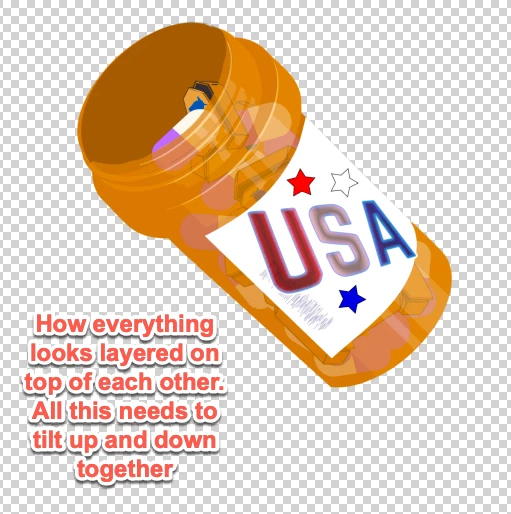
- Front of the pill bottle (Partially transparent so we can see the pills behind it)
- Multiple images of pills
- Multiple images of tiny coffins
I can make the pills come out of the bottle looking naturally by placing the pill & coffin images between the back of the pill bottle and the partially transparent front of the pill bottle.
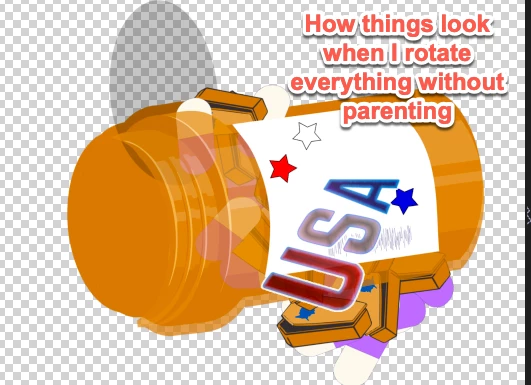
The only way I've been able to get all the images to rock up and down in unison is by parenting everything to the Front of the pill bottle image. However, by the time the bottle needs to rock back up to shake out more pills/coffins, any pill/coffin that has already begun moving toward the floor, begins to rotate with the front/back pill bottle images.
They all need to be able to rotate independently (that's why I made them all separate images), but also at some points move in unison until the pills/coffins shake out. Hopefully I'm explaining this correctly. I've also tried addressing this by creating a null object, but at some point things start look out of sync when rotated.
As the


 AdChoices