


Participant
Jan 9, 2019 3:46 PM UTC
Answered

Rotation Expression that Starts, Pauses, Restarts

I'm creating a 1920x360 video, where the right half is composed of 4 compositions I need to rotate 90 degrees, pause for 5-8s, then rotate 90 degrees, pause, etc.. and it just needs to loop.

I've set the 4 compositions as 3D objects, set their positions and rotations to create a 4 sided box essentially. I parented them to a NULL object, then set the key frames along the X rotation. If I grab the scrubber or play the video, I'm getting the desired effect. Problem is... it doesn't stop. It just keeps spinning. I just need to time it: Rotate 90 degrees, stop for 5 seconds, rotate for 90 degrees, stop for 5 seconds...

I've looked through the forum, expression libraries, YouTube... I can't find a solution. I've tried keyframing it, but the effect started breaking down because I'm ham fisted. Just looking for a simple script that does this effect.
    This topic is closed to new replies. Start a new post to keep the conversation going.
    Rick GerardCorrect answer
    Community Expert
    Jan 9, 2019 5:21 PM UTC

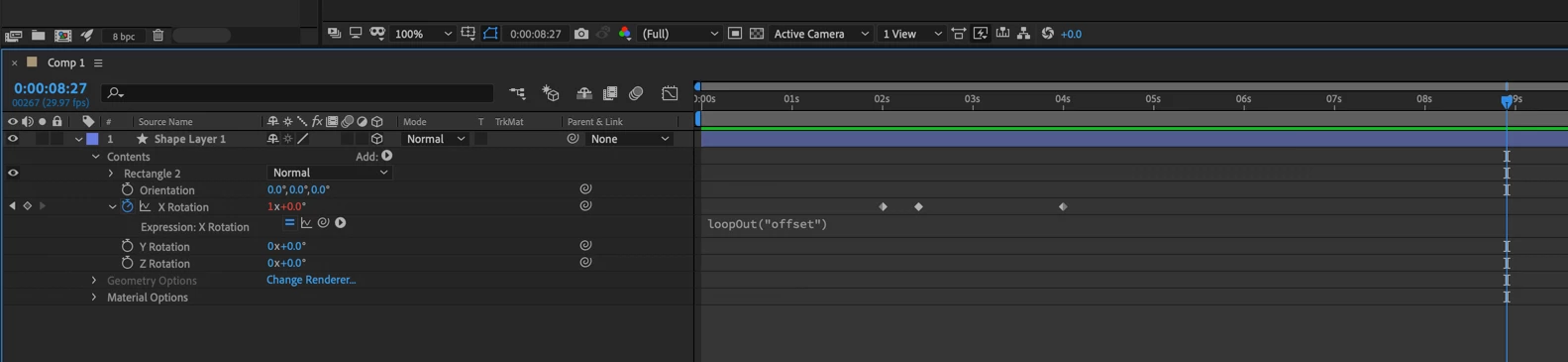
    By far the easiest solution is to use a loopOut("offset") expression and 3 keyframes. Move to the 5-second mark and set a keyframe of 0 x 0. Move down the timeline and set a keyframe of 0 x 90º, move to 10-seconds and copy and paste the last keyframe (0 x 90º). The loopOut("offset") expression will keep the loop/pause sequence going forever.

    I hope that makes sense.

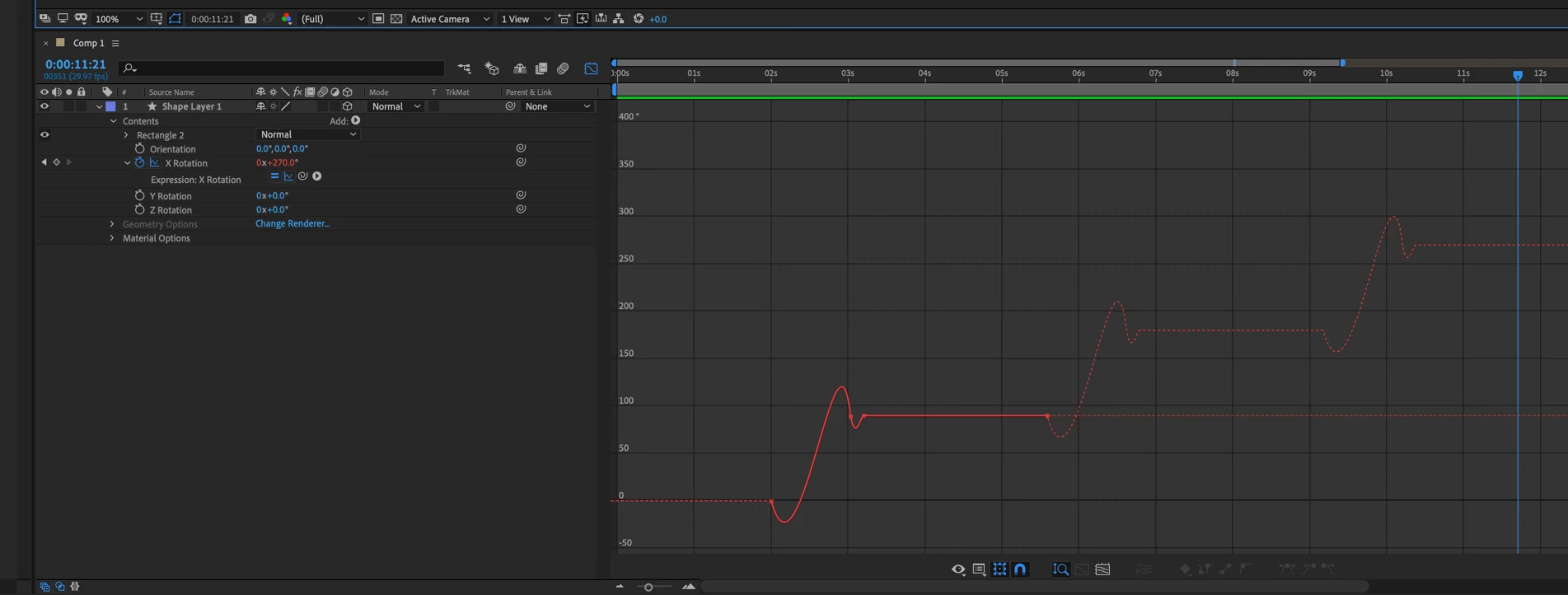
    You can apply easing if you want, or even make the layers bounce to a stop by adding another keyframe and using the pen tool to edit the value graph.

    Here's a pretty good tutorial on using the loop expressions that may give you some other ideas: https://www.schoolofmotion.com/blog/loop-expression-after-effects

    4 replies

    Participant
    Mar 2, 2023 8:42 PM UTC

    I stumbled on this post and realized I just wrote a function that does this:

    function stair(x, period, amplitude, iterations) {
        var scaledX = x / period * 2 * Math.PI;
        for (i = 0; i < iterations; i++) {
            scaledX = scaledX - Math.sin(scaledX);
        }
        return scaledX * amplitude / (Math.PI * 2);
    }
    stair(time, 5, 50, 5);


    "Period" is how long in seconds you want from move to move, amplitude is the amount it moves (in your case it would be 90) and iterations controls the smoothness of the move... that is, a value of 1 is basically a skewed sin curve, and a value of 5 is almost a staircase.  Maybe someone will find this useful.

    Translate
    Participant
    Dec 9, 2024 8:01 AM UTC

    "Maybe someone will find this useful." That someone is me, this really helped!

    Translate
    Rick GerardCommunity ExpertCorrect answer
    Community Expert
    Jan 9, 2019 5:21 PM UTC

    By far the easiest solution is to use a loopOut("offset") expression and 3 keyframes. Move to the 5-second mark and set a keyframe of 0 x 0. Move down the timeline and set a keyframe of 0 x 90º, move to 10-seconds and copy and paste the last keyframe (0 x 90º). The loopOut("offset") expression will keep the loop/pause sequence going forever.

    I hope that makes sense.

    You can apply easing if you want, or even make the layers bounce to a stop by adding another keyframe and using the pen tool to edit the value graph.

    Here's a pretty good tutorial on using the loop expressions that may give you some other ideas: https://www.schoolofmotion.com/blog/loop-expression-after-effects

    Translate
    snasm72Author
    Participant
    Jan 9, 2019 7:12 PM UTC

    Thank you. That did the job. About as simple and straightforward as it could get.

    Translate