

Participating Frequently
April 14, 2025
Question

Rotoscope brush not removing

  • April 14, 2025
  • 2 replies
  • 330 views

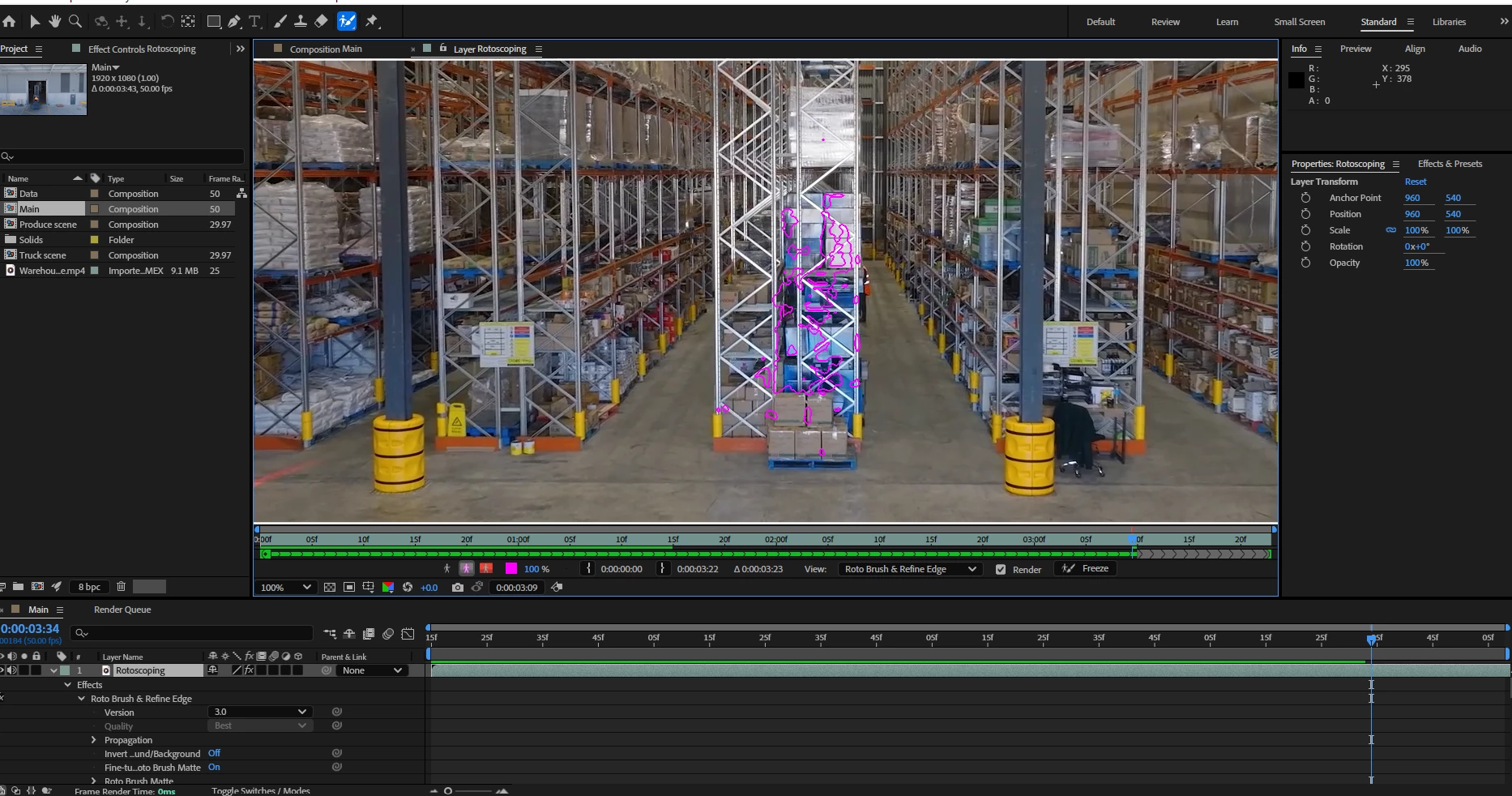
Hi I'm having trouble rotobrushing  when I try to remove nothing happens? The video looks rendered so I am not sure why its not removing

 

2 replies

Community Expert
April 14, 2025

First, what are you trying to isolate? I would not use rotobrush for that shot unless you do some serious masking and color correction to improve the edge detail and contrast of the details you are trying to isolate before attempting to use the tool.


To ensure that Rotobrush does not have problems on your system, try a very simple shot like a head-and-shoulders shot of a person with a simple background.


Ishan Y
Community Manager
Community Manager
April 14, 2025

Hey Eva,

Please go to the Composition viewer to see the changes. You're currently in Layer view. If you're happy with the Rotobrush selection, click the "Freeze" button in the Layer view to make the changes.


I recommend using the Layer Panel Video options to examine your Rotobrush selection. Here's an article for more details: https://helpx.adobe.com/in/after-effects/using/roto-brush-refine-matte.html#:~:text=Layer%20panel%20view%20options


Thanks,

Ishan

Please tag me (@) in your replies so that it notifies me and helps me respond promptly.