
SebPeru
Participant
December 3, 2022
Question

Rotoscope OUTLINES does not select image

  • December 3, 2022
  • 2 replies
  • 506 views

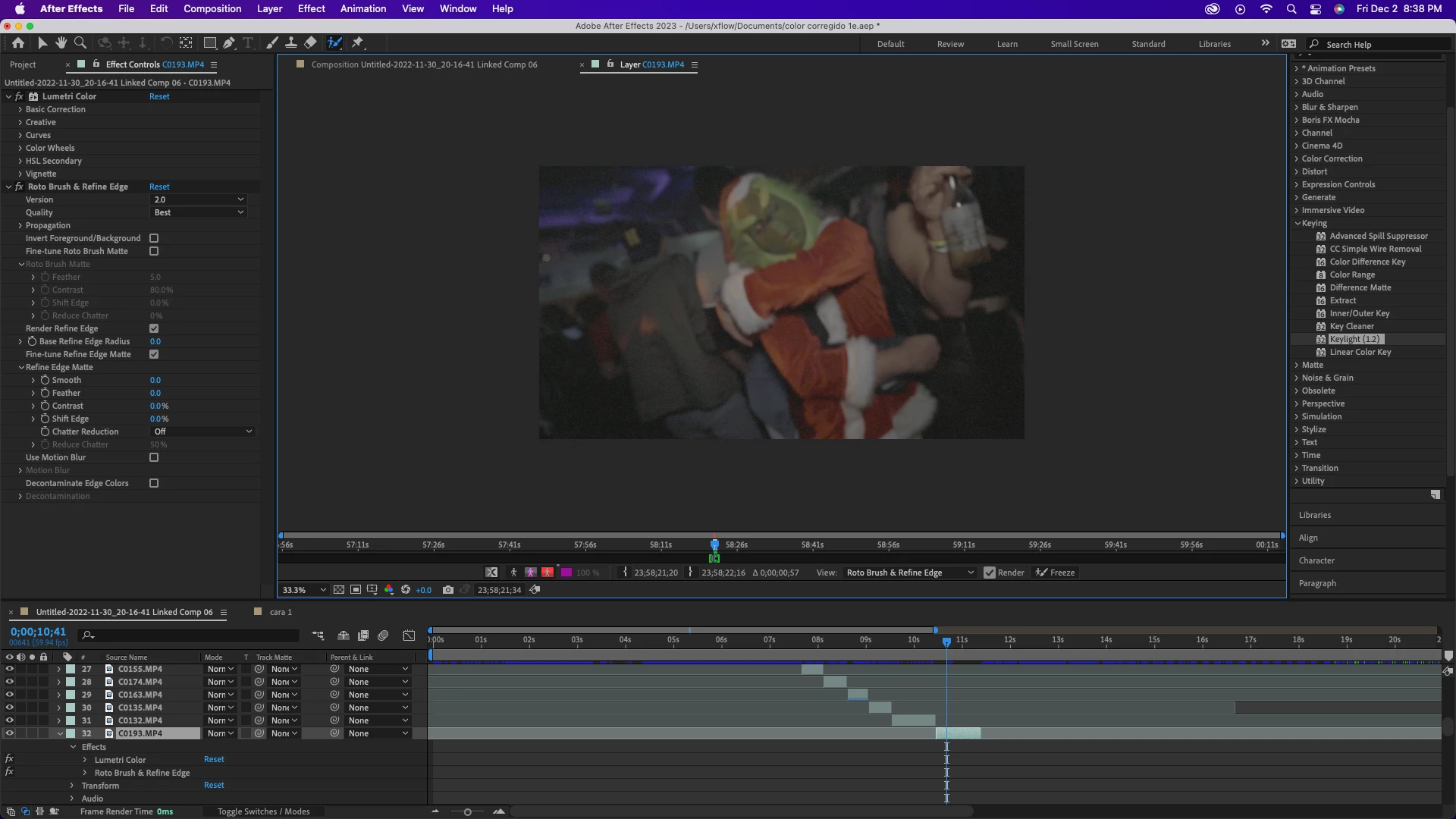
Hi Im new using After Effects 2022. Im trying to remove the backgroud using rotoscope but its not working for me. Ive already check it out if the fps are the same same as the project and the footage. 
I checked tutorials but i could not find a solution.
thank you for any help in advance.
This topic has been closed for replies.

2 replies

Mylenium
Legend
December 3, 2022

Aside from what Rick already said I wouldn't expect anything magic here. The footage is extremely noisy, blurry and underexposed which means even the smartest algorithm will struggle. You may end up having to mask this manually the old-fashioned way.


Mylenium

Community Expert
December 3, 2022

Here's my recommended Rotobrush workflow.

  1. Pre-compose the footage you want to apply Rotobrush to trim the new nested comp to the length of the layer. 
        The advantage is that you can apply Color Correction in the pre-comp if necessary to improve edge contrast and improve the roto, add garbage masks to eliminate things that Rotobrush doesn't have to calculate, and, most of all, it makes the timeline in the layer panel fill the panel so it is easier to see the area you are working on, the frames that have rendered, and what you are doing. your screenshot only shows a tiny portion of the footage, and it is very easy to accidentally include more frames or reduce the number of frames when the Footage Panel is looking at a clip that is a little more than 2 minutes long, and you are working on what looks like a little more than one second of the shot that needs Rotobrush. It also has the advantage of matching layer and comp frame rate.
  2. Make sure that everything is locked before you Freeze the roto. After the Roto has been frozen, you can preview the final result and make fine-tuning adjustments to Rotobrush in the Effects Control Panel while maintaining all of the AI-generated masks. 
  3. With the Rotobrush applied to a nested comp, it is easy to pre-compose again and then Render the Roto work using the Composition/Prerender menu. You can generate a DI (digital intermediate) with an alpha channel that replaces the Pre-comp with high-quality footage, eliminates the possibility of Rotobrush crashing when you render the comp, and, at the same time, significantly reduce the AEP file size and increase the stability of the project.


I'm not sure what problems you are having. I do see that Lumetri has been applied to the layer and then Rotobrush. That is not a good idea. Rotobrush should be the only effect on a layer. If you need color correction, pre-compose after color correction. If you need other effects after Rotobrush, Pre-compose the Rotobrush layer. Any layer with Rotobrush applied should not have any Transform property modified and should not have any other effect applied to the layer.