Inspiring
March 8, 2021
Question

Round corners squished even scaling with RC effector

  • March 8, 2021
  • 2 replies
  • 4236 views

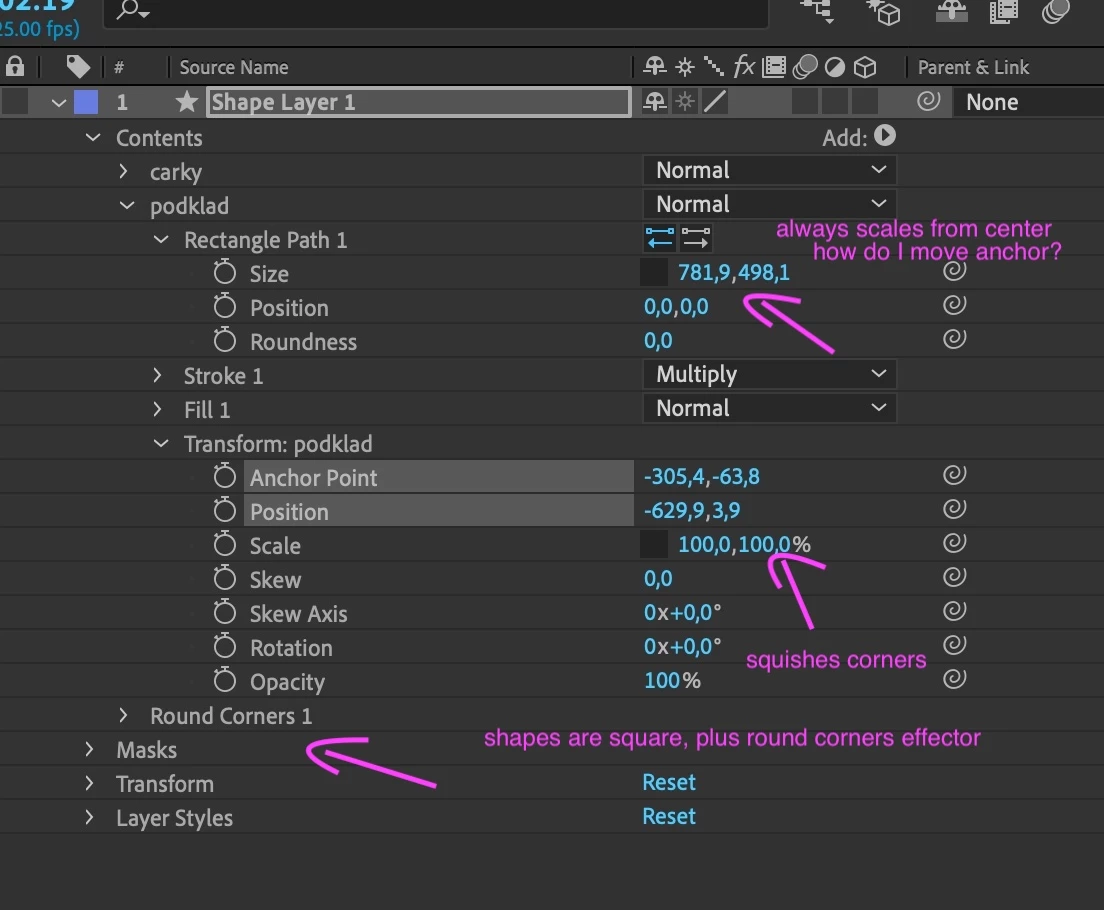
My corners are squished even when it's setup like this (pic). The only way to have rounded corners to not squish is to "Size" the Rectangle path itself, but that's always from center. I want to scale from the shape's bottom. I definitely had this working before as it's a basic thing, but somehow I can't figure it out now. Please help.
 

2 replies

Community Expert
March 8, 2021

If you scale X and Y differently the round corners will always distort. As long as both X and Y scale value is equal, the corners will keep their constant radius. 


You can adjust the Transform Rectangle/Anchor Point to change the center of the Transform Rectangle/Scale. It works the same way as Layer/Transform/Anchor Point and Layer/Transform/Scale.


If you want to keep the roundness perfect, animate the X and Y size value of the rectangle.


To animate the size of the rectangle and keep the bottom from moving add this simple expression to the Transform Rectangle/Anchor Point. It adjusts the anchor point to half the Y size value and keeps the bottom of the Parametric rectangle from moving.

y = content("Rectangle 1").content("Rectangle Path 1").size[1] / 2;
[0, y]

Here are all the modified properties of my shape layer:


The only thing causing your problem is workflow. You are not using the controls properly. 

RajovoAuthor
Inspiring
March 8, 2021

Hm, I thought the purpose of having the Round Corner effector separately and being applied after the transform was exactly why it's there - to round after scaling. I guess I was wrong, but having to resort to expressions for something this basic is not good.


Thanks though! 

Participant
June 28, 2023

I have been using the same trick as you for years, I went to do it again today, and I am running into the exact same problem you are now. This never used to work this way - weird. Guess they've changed the way this works now.

Mylenium
Legend
March 8, 2021

The path is a parametric entity. It's center canmot be changed. The rest should easily be fixed by re-ordering and re-grouping your items, though it's impossible to say what actually may be going on since you haven't included the comp view. Could just as well be that you have messed up the comp pixel aspect ratio or the layer's global transform, in which case of course that would need to be rectified.


Mylenium

RajovoAuthor
Inspiring
March 8, 2021

It's exactly the reordering I can't figure out, and I just don't know why. Here, makes sense? Thanks!