

marc.cardwell
Inspiring
July 3, 2018
Answered

scaling a mask, but not the image the mask is masking

  • July 3, 2018
  • 1 reply
  • 37660 views

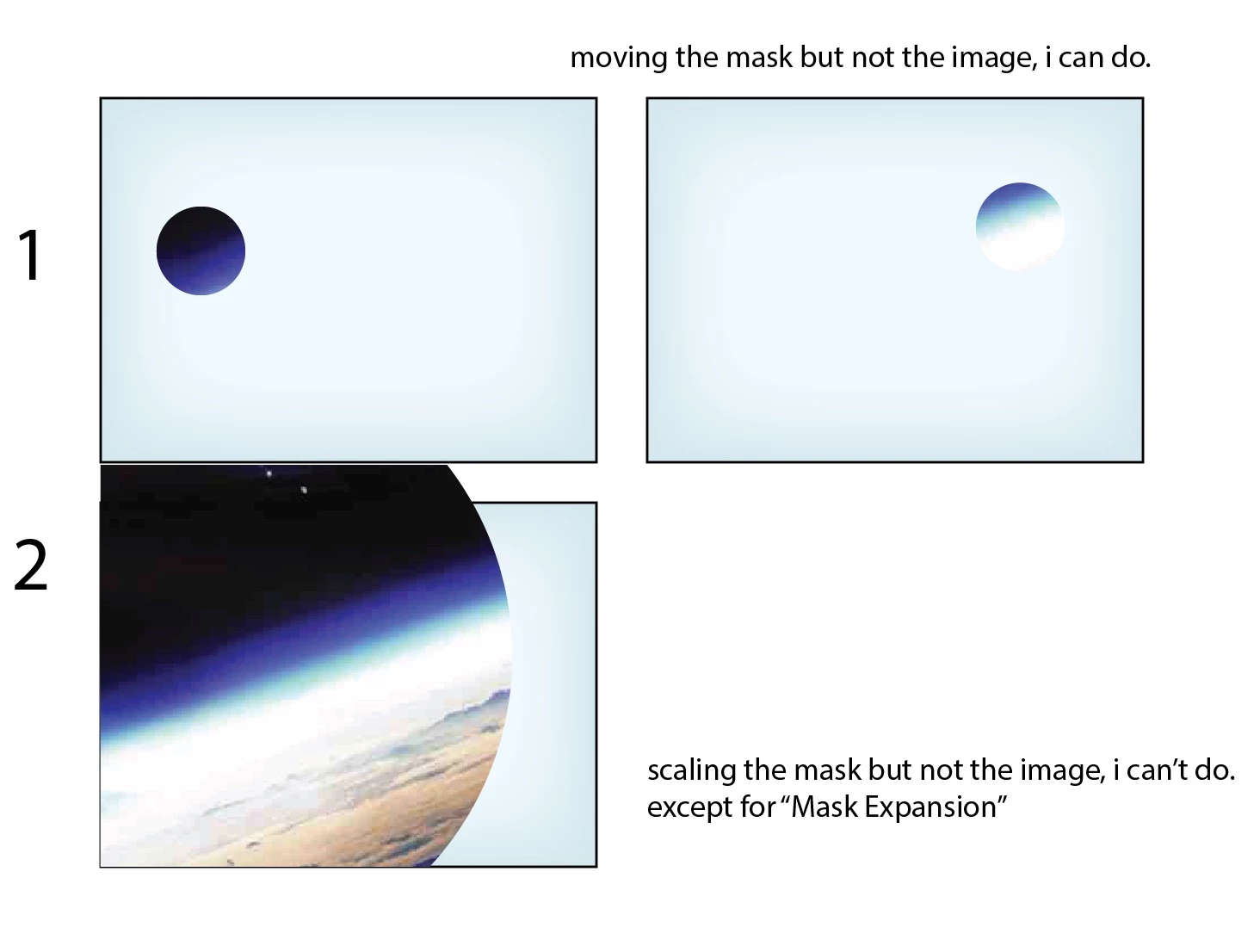
hi, title clumsily says it all. i want to scale a circle vector mask, but not scale the image the circle vector mask is masking. i do see how to animate / move the mask Path, that's easy. a work-around (or maybe this is the bast way), is to and animate the Mask Expansion. what i'm needing to do looks like the image below. i tried editing Mask Shape, but figuring out what to enter for top, right, bottom, and left is more work than i want to learn how to do. thanks in advance for any help in this matter!
    This topic has been closed for replies.
    Correct answer Roei Tzoref

    you can click twice on the mask or use the shortcut Ctrl+T - each will give you the transform box for the mask.

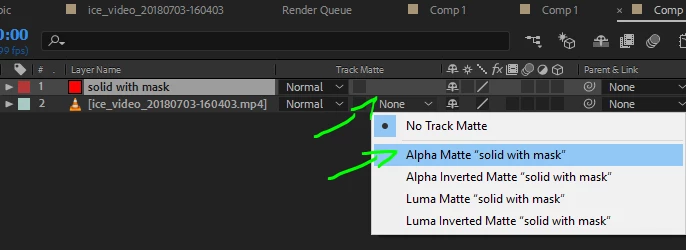
    if you want more control, you might consider using a track matte (clipping mask) instead of a mask on the layer. simply create a shape layer or a masked solid above your source image and set the source to track matte the layer above like this:

    now you can animate the matte freely from the shape instead of animating the path of the mask.

    1 reply

    Roei Tzoref
    Roei TzorefCorrect answer
    Legend
    July 3, 2018

    you can click twice on the mask or use the shortcut Ctrl+T - each will give you the transform box for the mask.

    if you want more control, you might consider using a track matte (clipping mask) instead of a mask on the layer. simply create a shape layer or a masked solid above your source image and set the source to track matte the layer above like this:

    now you can animate the matte freely from the shape instead of animating the path of the mask.

    marc.cardwell
    Inspiring
    July 3, 2018

    thank you! this is so easy, now i'm not sure what i was doing before. sometimes, when i double click, i get another window with that layer isolated. i need to click exactly on the mask path...

    reading your second method (i remembered how to Toggle Switches, yea me), i think i can see what this is better, but i'll need to experiment more. i'm an old, long-time AI, PS and IND user, and i think in terms of the way these apps work. i love AE, but it often has its own way of doing things and it is a deep, dense app (which makes it so awesome).

    Roei Tzoref
    Legend
    July 3, 2018

    Yeah double clicking will get you sometimes so try Ctrl T instead. Also in the layer window is also a good and even superior way to manipulate your mask because you are in the layer context and not the composition. You even have quickmask mode

    as for Ae's alpha matte - it's very similar to Ai's Clipping mask. The above layer is the matte (Mask) for the layer below.