Participant
October 23, 2014
Answered

Script for Linking multiple layers to a null layer

  • October 23, 2014
  • 1 reply
  • 1082 views

I'm trying to link multiple layers to an animated null layer but I want each layer to start the animation from layer starting time.

What would be the script I need to add instead duplicating null layer for every layers?

I hope that question isn't too confusing to understand lol

TIA

W

This topic has been closed for replies.
Correct answer Dan Ebberts

Sorry, I'm not good at explaining things though texts lol

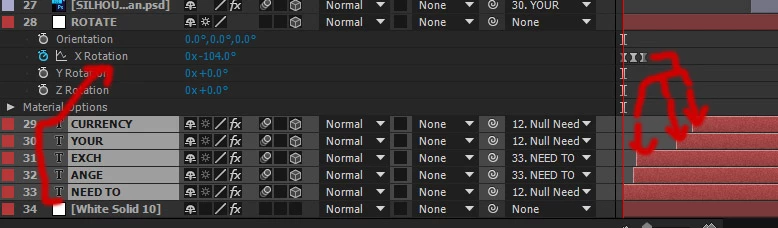
Hopefully this picture can explain better what I'm trying to achieve.

I want to link the text layers to ROTATE null object but I want the keyframes to start at the beginning of each of text layer. This way, I won't need keyframes for each text layer and I can adjust the timing easier later. I know the script lines to link them to a null object but I can't figure out the line to tell the keyframes to start at the beginning of the layer instead the null object in the timeline.

I think I just made this more confusing lol

I think you could do that with an expression like this:

thisComp.layer("ROTATE").transform.xRotation.valueAtTime(time-inPoint)

Dan

1 reply

animexiaAuthor
Participant
October 24, 2014

Anyone?

UQg
Legend
October 24, 2014

Your question could be clearer. Maybe a screenshot would help.

animexiaAuthor
Participant
October 24, 2014

Sorry, I'm not good at explaining things though texts lol

Hopefully this picture can explain better what I'm trying to achieve.

I want to link the text layers to ROTATE null object but I want the keyframes to start at the beginning of each of text layer. This way, I won't need keyframes for each text layer and I can adjust the timing easier later. I know the script lines to link them to a null object but I can't figure out the line to tell the keyframes to start at the beginning of the layer instead the null object in the timeline.

I think I just made this more confusing lol