
Participant
July 7, 2023
Answered

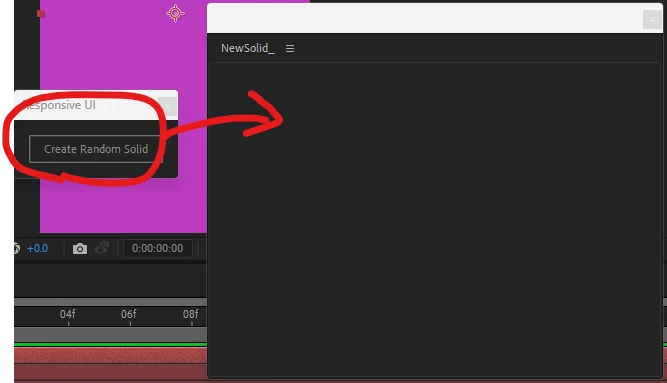
Script panes cannot be merged closer to the viewport_but i i still can't solve the problem

  • July 7, 2023
  • 1 reply
  • 297 views


I used AE 2023 JAVA.
Write a small button that creates random layers with Microsoft VS Code.
But it has been unable to integrate a panel with the original Script panel or put it into the same panel.

(function () {
  build_UI(this);
  function build_UI(thisObj) {
    var myPanel = (thisObj instanceof myPanel) ? (thisObj) : (new Window("palette", "Responsive UI", undefined, {
      resizeable: true
    }));
    var comp = app.project.activeItem;
    var solidLayers = [];
    if (comp && comp instanceof CompItem) {
      var createButton = myPanel.add("button", undefined, "Create Random Solid");
      createButton.onClick = function () {
        var newSolidLayer = comp.layers.addSolid([Math.random(), Math.random(), Math.random()], "Random Solid", comp.width, comp.height, comp.pixelAspect);
        newSolidLayer.moveToBeginning();
        solidLayers.push(newSolidLayer);
      };
      myPanel.center();
      myPanel.show();
    } else {
      alert("Please select a composition.");
    }
  }
  build_UI(this);
})();
This topic has been closed for replies.
Correct answer Paul Tuersley

Various things that are wrong here. There are various examples of this already posted on here including:

https://community.adobe.com/t5/after-effects-discussions/create-a-script-for-quot-install-scriptui-panel-quot-without-having-2-windows/m-p/13282374

- when launched as a panel, AE supplys the panel object and you have to pass 'this' into the scope of your outer function.

- you should be asking if thisObj is an instanceof a 'panel' type, not 'myPanel' which is your variable.

- you don't really want a user having a comp selected as a basis for whether the UI gets created. just create it regardless then test for the active comp when the button is clicked.

function main(thisObj) {
	function build_UI(thisObj) {
		var myPanel = (thisObj instanceof Panel) ? (thisObj) : (new Window("palette", "Responsive UI", undefined, { resizeable: true}));

		var createButton = myPanel.add("button", undefined, "Create Random Solid");

		createButton.onClick = function () {

			var comp = app.project.activeItem;
			if (comp != null && comp instanceof CompItem) {
				var solidLayers = [];
				var newSolidLayer = comp.layers.addSolid([Math.random(), Math.random(), Math.random()], "Random Solid", comp.width, comp.height, comp.pixelAspect);
				newSolidLayer.moveToBeginning();
				solidLayers.push(newSolidLayer);
			} else {
				alert("Please select a composition.");
			}
		};
		
		if (myPanel instanceof Window) {
			myPanel.center();
			myPanel.show();
		} else {	
			myPanel.layout.layout(true);
		}	
	}

	build_UI(thisObj);
  }
  main(this);


1 reply

Paul TuersleyCorrect answer
Inspiring
July 7, 2023

Various things that are wrong here. There are various examples of this already posted on here including:

https://community.adobe.com/t5/after-effects-discussions/create-a-script-for-quot-install-scriptui-panel-quot-without-having-2-windows/m-p/13282374

- when launched as a panel, AE supplys the panel object and you have to pass 'this' into the scope of your outer function.

- you should be asking if thisObj is an instanceof a 'panel' type, not 'myPanel' which is your variable.

- you don't really want a user having a comp selected as a basis for whether the UI gets created. just create it regardless then test for the active comp when the button is clicked.

function main(thisObj) {
	function build_UI(thisObj) {
		var myPanel = (thisObj instanceof Panel) ? (thisObj) : (new Window("palette", "Responsive UI", undefined, { resizeable: true}));

		var createButton = myPanel.add("button", undefined, "Create Random Solid");

		createButton.onClick = function () {

			var comp = app.project.activeItem;
			if (comp != null && comp instanceof CompItem) {
				var solidLayers = [];
				var newSolidLayer = comp.layers.addSolid([Math.random(), Math.random(), Math.random()], "Random Solid", comp.width, comp.height, comp.pixelAspect);
				newSolidLayer.moveToBeginning();
				solidLayers.push(newSolidLayer);
			} else {
				alert("Please select a composition.");
			}
		};
		
		if (myPanel instanceof Window) {
			myPanel.center();
			myPanel.show();
		} else {	
			myPanel.layout.layout(true);
		}	
	}

	build_UI(thisObj);
  }
  main(this);


JohnnyHSUAuthor
Participant
July 12, 2023

Thank u so much!!!
U're my sunshine!!!