
frankiej123
Known Participant
October 17, 2022
Question

Script to Zero Out Shape Path Transforms

  • October 17, 2022
  • 4 replies
  • 969 views

Hi,

Has anybody got a little script that can zero out the anchor point and position here. If there were multiple paths under the same Shape Layer it would also zero them all (i.e. set them to the values shown). Just need a run and done kinda thing. 
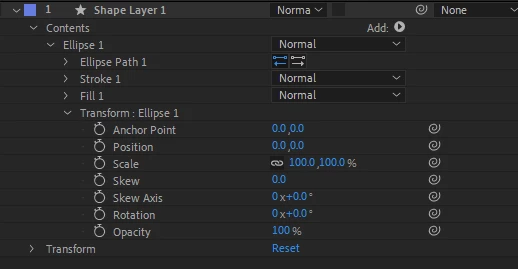
 

This topic has been closed for replies.

4 replies

ShiveringCactus
Community Expert
Community Expert
October 18, 2022

The closest option I can think of is to save a shape as a preset - with it already centred.  It's pretty easy to add from Effects & Presets and then you make changes, stack shapes etc...

It's a shame that we have "Center Anchor Point to Layer Content" but not "Center shape to Anchor Point" or words to that effect.  "Center in View" works nicely for non-shapes of course.

ShiveringCactus
Community Expert
Community Expert
October 18, 2022

Actually, hold on a second.  An animation preset can be as little as a single value.  I'll need to play with this more but I've just tried saving a shape's position as 0,0 and then applying it to another shape and it updated the position values.  So not a script, but it would be simple enough to select your shapes and double-click on the preset to apply such an option.

frankiej123
Known Participant
October 19, 2022

That's a clever suggestion. I'm sure this is scriptable though, just need someone with the know 😞

thepixelsmith
Community Expert
Community Expert
October 18, 2022

While I don't know of a script to do it myself. If you haven't already you may want to check out aenhancers.com

They have a scripting library and might have one for this.

Mylenium
Legend
October 17, 2022

I know of no such pre-made tool, but it sounds perfectly doable if you modify an existing script to reset all properties to their default value. Likely actually checking the property types would be more complicated than actually resetting the values. Anyway, I suggest you browse AEScripts.com if you can find something that may either be applicable directly or a basis for the modifications. Perhaps Dan Ebberts pops in later and will provide some code snippet.


Mylenium

frankiej123
Known Participant
October 18, 2022

Thanks, I don't have the knowledge to be able to do this, aescripts doesn't have this. Anybody else able to help?

frankiej123
Known Participant
October 17, 2022

Just to clarify, script  would go through all selected Shape Layers and zero out the Path Transforms.