

Question
Scripting Problem: %20 Makes My Script Not Read My Links / Files
I've been having this error of the script not being able to find the file (shortcut files or .lnk) even though it is at the location. I know that the %20 mean to be spaces but I don't know how to deal with it (See warning).
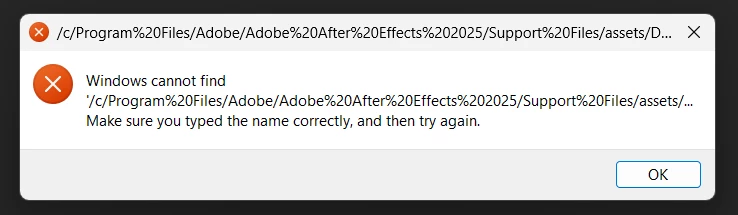
Here's my script!
// Function to open Chrome profiles (Windows only)
function openChromeProfile(profileFileName, url) {
    // Get the script's location
    var scriptFolder = new File($.fileName).parent;

    // Construct the full path to the .lnk file
    var profilePath = new File(scriptFolder.fsName + "/assets/" + profileFileName);

    // Debug: Show expected full path
    alert("Script is running from: " + scriptFolder.fsName);
    alert("Checking file path: " + profilePath.fsName);

    if (profilePath.exists) {
        alert("Found: " + profilePath.fsName);
        system.callSystem('cmd /c start "" "' + profilePath.fsName + '"');
    } else {
        alert("❌ ERROR: Profile shortcut not found!\nExpected at: " + profilePath.fsName +
            "\n\nPossible fixes:\n- Ensure the .lnk file exists inside the assets folder.\n" +
            "- Check for spaces or hidden file extensions in the filename.\n" +
            "- Try manually opening this path in File Explorer.");
    }
}
If someone could help, thanks in advance!


 AdChoices