var res = "group{orientation: 'column', alignment:['fill', 'fill'],\
				content: Group{alignment:['fill', 'fill'],\
				checks: Panel{orientation: 'column', alignment:['fill', 'fill'], spacing: 2,";
		var b, imports = [];
		for (var i in seqs)
		{
			b = !Boolean(seqs[i].lighting);
			res += 'c' + imports.length + ":Group{alignment:['fill', 'top'], btn: Checkbox{text: '" + seqs[i].label + "', alignment:['left', 'fill'], enabled:" + b + ', value:' + b + "},\
			v: StaticText{text: 'v" + numberFormat(seqs[i].version) + "', alignment:['right', 'fill']}},";
			imports.push(seqs[i]);
		}

		res += "}, scroll: Scrollbar{alignment:['right', 'fill']}},\
						footer: Group{alignment:['fill', 'bottom']\
						toggle: Button{text: 'Deselect All',  alignment:['left', 'fill']},\
						okBtn: Button{text: 'Import',  alignment:['fill', 'fill']},\
						},\
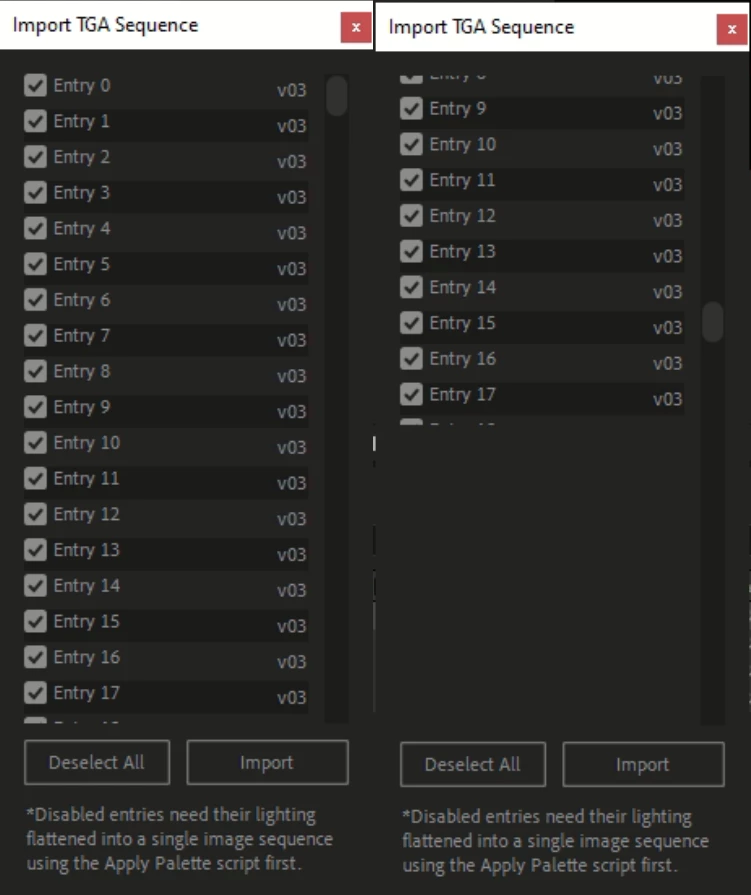
						lighting: StaticText{text: '*Disabled entries need their lighting flattened into a single image sequence using the Apply Palette script first.', properties: {multiline: true, resizeable: true}, alignment:['fill', 'fill']},\
						},\
				}";
		$w.grp = $w.add(res);
		var grp = $w.grp.content.checks;
		var scroll = $w.grp.content.scroll;
		scroll.maximumSize[0] = 15;
		grp.maximumSize[1] = 800;
		//$w.show();
		var height = (20 + grp.spacing) * imports.length;
		$w.resizeable = grp.resizeable = $w.grp.content.resizeable = true;
		var allChecks = function($f)
		{
			for (var i = imports.length - 1; i >= 0; i--)
				$f(grp['c' + i].btn, imports[i], i);
		};
		var color = $w.graphics.newBrush($w.graphics.BrushType.SOLID_COLOR,[28/255,29/255,26/255], 1);
		allChecks(function($b, $m, $i)
		{
			if ($i % 2) $b.parent.graphics.backgroundColor = color;
		});

		scroll.onChanging = function()
		{
			grp.location.y = this.value/100 * (grp.maximumSize.height - height);
			$w.onResize();
		};
		$w.grp.footer.okBtn.onClick = function()
		{
			var comp = getComp();
			if (!comp) return;
			app.beginUndoGroup('Import TGAs');
			app.beginSuppressDialogs();
			allchecks(function($btn, $import)
			{
				if ($btn.value) TGASequence.import($import.folder, comp);
			});
			app.endSuppressDialogs(false);
			app.endUndoGroup();
			$w.close();
		};
		$w.grp.footer.toggle.onClick = function()
		{
			if (this.text == 'Deselect All')
			{
				this.text = 'Select All';
				allChecks(function($btn)
				{
					$btn.value = false;
				});
			}
			else
			{
				this.text = 'Deselect All';
				allChecks(function($btn)
				{
					$btn.value = true;
				});
			}
			this.active = true;
			this.active = false;
		};
		$w.onClose = function()
		{
		}
		$w.onResizing = $w.onResize = function()
		{
			this.layout.resize();
		};
Thanks for posting your code. It would have been even better if the code ran rather than having to spend time constructing stuff around it to get it to run. By the time I'd done that I couldn't be sure I was seeing exactly the same issue you were.
This is tricky stuff. Can't find the link now but one thing I read in my searching on this is that perhaps the panel can never be bigger than the display dimensions, so that approach might always have a size limitation even if it could be figured out.
Anyway, I found this solution where rather than moving the panel with the scrollbar you move the child elements inside it:
https://community.adobe.com/t5/after-effects/scrollable-panel-gets-truncated/m-p/8056993
And after much fiddling around I came up with this. As a shortcut I just recorded the initial location of each child element then offset it. I'm sure that cound be done better.
var seqs = new Array();
var temp;

for (var x= 0; x < 30; x++){
	temp = new Object();
	temp.label = "Entry "+x;
	temp.version = "3";
	seqs.push(temp);
}

var $w = new Window("palette", "test", undefined, {resizeable:true});

var res = "group{orientation: 'column', alignment:['fill', 'fill'],\
				content: Group{orientation:'row', alignment:['fill', 'fill'],\
				checks: Panel{orientation: 'column', alignment:['fill', 'fill'], spacing: 2,";
		var b, imports = [];
		for (var i = 0 ; i < seqs.length; i++)
		{
			b = !Boolean(seqs[i].lighting);
			res += 'c' + imports.length + ":Group{alignment:['fill', 'top'], btn: Checkbox{text: '" + seqs[i].label + "', alignment:['left', 'fill'], enabled:" + b + ', value:' + b + "},\
			v: StaticText{text: 'v" + seqs[i].version + "', alignment:['right', 'fill']}},";
			imports.push(seqs[i]);
		}

		res += "}, scroll: Scrollbar{alignment:['right', 'fill']}},\
						footer: Group{alignment:['fill', 'bottom']\
						toggle: Button{text: 'Deselect All',  alignment:['left', 'fill']},\
						okBtn: Button{text: 'Import',  alignment:['fill', 'fill']},\
						},\
						lighting: StaticText{text: '*Disabled entries need their lighting flattened into a single image sequence using the Apply Palette script first.', properties: {multiline: true, resizeable: true}, alignment:['fill', 'fill']},\
						},\
				}";
		$w.grp = $w.add(res);
		var grp = $w.grp.content.checks;
		var scroll = $w.grp.content.scroll;
		scroll.maximumSize[0] = 15;

		var height = (20 + grp.spacing) * imports.length;
		$w.resizeable = grp.resizeable = $w.grp.content.resizeable = true;

		var color = $w.graphics.newBrush($w.graphics.BrushType.SOLID_COLOR,[28/255,29/255,26/255], 1);

		$w.preferredSize.height = 200;

		$w.show();

		$w.bounds.height = 400;
		$w.layout.resize();

		var locationArray = new Array();
		for (x = 0; x < seqs.length; x++) {
			locationArray.push($w.grp.content.checks.children[x].location.y);
		}


		scroll.onChanging = function()
		{
			for (var x = 0; x < $w.grp.content.checks.children.length; x++) {
				$w.grp.content.checks.children[x].location.y = locationArray[x] + this.value/100 * (($w.grp.content.bounds.height - (height + 10)));
			}

		};


		$w.onResizing = $w.onResize = function()
		{
			this.layout.resize();
			for (var x = 0; x < $w.grp.content.checks.children.length; x++) {
				$w.grp.content.checks.children[x].location.y = locationArray[x] + $w.grp.content.scroll.value/100 * (($w.grp.content.bounds.height - (height + 10)));
			}
		};




 AdChoices