Participant
Jun 21, 2021 3:06 AM UTC
Answered

Separate Dimensions greyed out

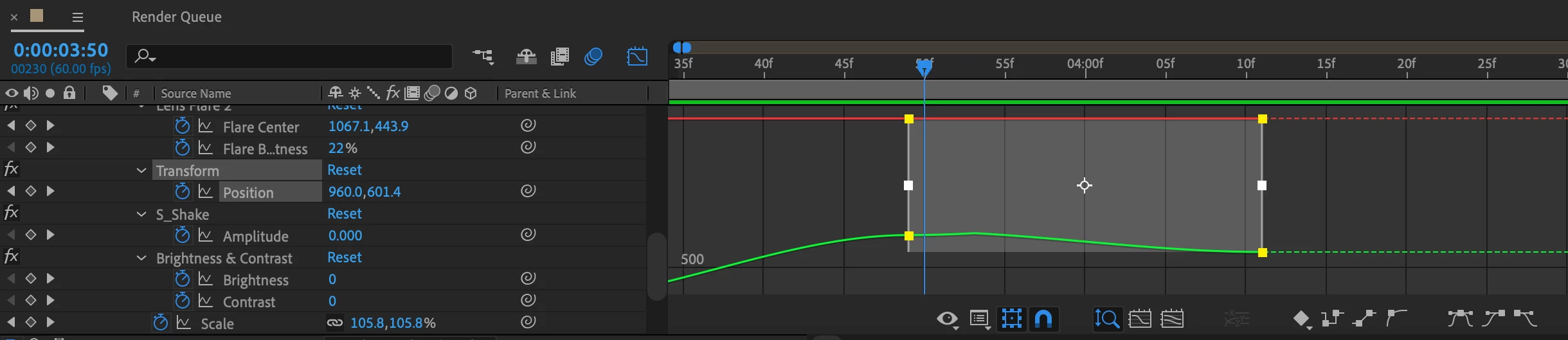
There is something wrong in this position graph but i can't enable Separate Dimensions to edit it. Whats going on? 

mrwitte
mrwitteCorrect answer
Participating Frequently
Sep 10, 2023 3:34 AM UTC

On some stuff you simply can't Separate Dimensions and you're just out of luck. I'm currently experiencing that on the Position values of Contents on Shape Layers. I get around this by doing the following:

Set up two Slider effects on your layer, one called POS X and the other called POS Y

ALT+LeftClick on the Position value of the item you wish you could Separate Dimensions on, and enter the Expression below:

x = [pickwhip value to Slider POS X];

y = [pickwhip value to Slider POS Y];

[x,y]

Animate/keyframe the values of the two sliders instead of the Position value
18 replies

Participant
Feb 18, 2024 1:05 PM UTC

You have to right click on layer name and see if "3D layer" option is checked.
You can only see separate dimensions active if this option is checked.

Translate
mrwitte
mrwitteCorrect answer
Participating Frequently
Sep 10, 2023 3:34 AM UTC

On some stuff you simply can't Separate Dimensions and you're just out of luck. I'm currently experiencing that on the Position values of Contents on Shape Layers. I get around this by doing the following:

Set up two Slider effects on your layer, one called POS X and the other called POS Y

ALT+LeftClick on the Position value of the item you wish you could Separate Dimensions on, and enter the Expression below:

x = [pickwhip value to Slider POS X];

y = [pickwhip value to Slider POS Y];

[x,y]

Animate/keyframe the values of the two sliders instead of the Position value

Translate
Community Expert
Oct 23, 2023 2:48 AM UTC

Separating dimensions wipes out the ability to use the Composition panel to edit a motion path. The bezier handles disappear. Almost all motion arrays benefit from the ability to edit a motion path with the pen tools. In most cases, it is incredibly difficult to accurately control any path by animating separate dimensions. On the rare occasion that you need to separate dimensions to control the timing of specific paths at specific times, expressions can easily solve problems. I would be surprised if I have used Separate Dimensions more than twice in the last year. Those compositions would have been some kind of infographic involving attaching something to an animated graph.


Translate
CLWill
Inspiring
Aug 16, 2021 7:20 PM UTC

Another way to solve this is to create a null object, and tie the position property of the effect to the position of the null object (via pick whip). You can then animate the null, with separate dimensions, full bezier handles and all, and get the same impact.

Translate
Participant
Nov 16, 2021 6:22 PM UTC

how?

Translate
CLWill
Inspiring
Nov 16, 2021 8:07 PM UTC

Create a null object. Pick whip the position properly of your object to the position of the null. Animate the null as desired. 

Translate
Szalam
Community Expert
Community Expert
Jun 21, 2021 4:46 AM UTC

For the record, you can pretty easily get separated dimensions by applying three expression effects sliders to a layer and then tying the three position properties to those sliders.

Translate
Participant
Nov 16, 2021 6:21 PM UTC

That's nice. care to share more?


Translate
Shane5E25Author
Participant
Jun 21, 2021 3:41 AM UTC

Alright, i copied the keyframes from the Transform effect and moved it into the actual position keyframes of the clip. Fixed, Thank you!

Translate
Community Expert
Jun 21, 2021 3:14 AM UTC

AFAIK, you can only separate dimensions of the property "position" of the layer, you can't do that for the parameters of effects, even the "Position" parameter of the "Transform" effect

Translate
Participant
Apr 22, 2023 9:42 PM UTC

Why do we pay adobe 54.99 a month again?

Translate
Participant
Oct 23, 2023 2:38 AM UTC

Its becoming increasingly embarrassing that we pay what we pay.

Translate