


Participant
September 23, 2026
Answered

Set BASE framerate

  • September 23, 2026
  • 3 replies
  • 27 views

Hi there.


Maybe it is a bug but I noticed strange behaviour.

My compositions are set to 25fps, every .png sequence imported is set to 25fps. My Preview windows is set to 25fps. However when I import .wav file it is being interpret as 30fps. When I try to playback it in Footage windows it is pitched down. When I change framerate in Preview window to 30fps it plays exactly as it is suppose to, but then preview of my comp is pitched and sped up.

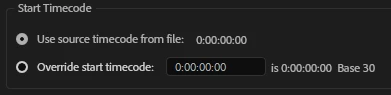
When I manually adjust timecode of the .wav file in Interpret Footage window it says “… Base 30”. I assume that it automatically interpret footage as 30fps when I am trying to handle it outside the comp. When I add it to the comp and play it back in 25fps it works fine. 

What sucks is that I need to override timecode according to the inner timecode of the footage and cut it in exact frame. However I cannot to that because of 30fps vs 25fps.

Is there a way to change Base framerate?
 

    Correct answer Joost van der Hoeven

    It’s a know kwirk in Ae. As Ae doesn’t work with frame rates but in decimals (eg 00:00:01:05 in 25 fps is 1.2 seconds, and this is what Ae actually calculates time with), you can just be be pratical: ignore the Base 30 label on your WAV entirely, work with the audio only inside your 25fps comp where it already plays correctly, and handle frame-accurate placement using the comp's own timecode ruler rather than the audio item's self-reported (and largely meaningless) timecode base.

    3 replies

    Warren Heaton
    Community Expert
    Community Expert
    September 25, 2026

    Audio only files have a sample rate, not a frame rate.

    To associate a frame rate to an audio only file, render it as a video file at the desired frame rate and then import that back into Ae.


    Joost van der Hoeven
    Community Expert
    Community Expert
    September 27, 2026

    This would work, but you don’t need to export; Create a comp called Audio, with the desired frame rate and put the audio file in it. Place this Audio comp inside your animation comp and now you can use frames to reference it.

    Joost van der Hoeven
    Community Expert
    Joost van der HoevenCommunity ExpertCorrect answer
    Community Expert
    September 25, 2026

    It’s a know kwirk in Ae. As Ae doesn’t work with frame rates but in decimals (eg 00:00:01:05 in 25 fps is 1.2 seconds, and this is what Ae actually calculates time with), you can just be be pratical: ignore the Base 30 label on your WAV entirely, work with the audio only inside your 25fps comp where it already plays correctly, and handle frame-accurate placement using the comp's own timecode ruler rather than the audio item's self-reported (and largely meaningless) timecode base.
