

Question
Set Saber Properties using Extendscript
I am using ExtendScript with VideoCopilot's "Saber" plug-in, but I'm having some problems. The way the plug-in is set up is that there are multiple effect properties with the exact same name but under different drop down arrows. For example:
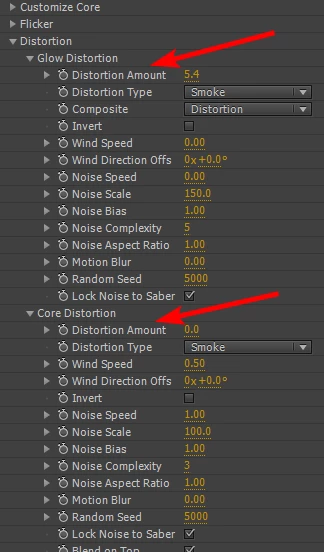
As you can see, there are multiple properties with the name "Distortion Amounnt." In ExtendScript, if I want to change the property with something like:
myLayer.property("Effects").property("Saber").property("Distortion Amount").setValue(5)
It only changes the very first one in the list (in other words, the Glow Distortion). Suppose I want to change the Core Distortion as well with ExtendScript. How would I reference it in ExtendScript? How do I change the Core Distortion effect property?


 AdChoices