
Participant
March 31, 2022
Question

Setting Duration to seconds

  • March 31, 2022
  • 2 replies
  • 167 views

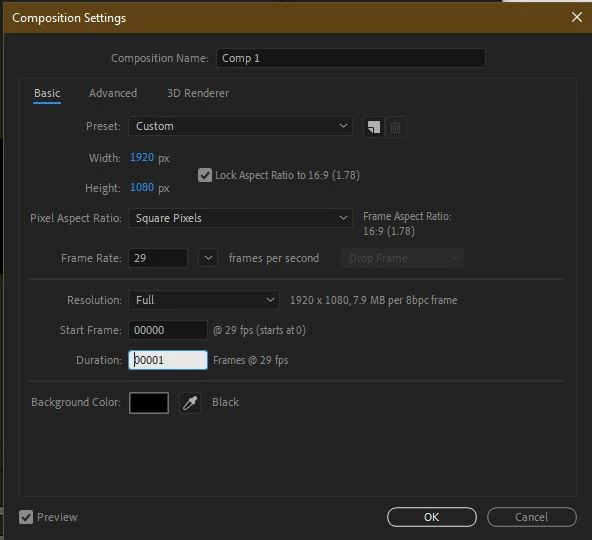
Hello all I am very new to AE. I have a school project to make an animated logo. The duration of the file is set in frames and will not let me set it to seconds. I have even tried manually typing in the duration as 00:00:06:00 and it sets it to 1 frame, even though my frames are set to 29 frames per second. I am very lost if anyone can help me with this problem, thanks!
This topic has been closed for replies.

2 replies

nishu_kush
Legend
April 1, 2022

Hi BB94,


As Mylenium suggested, go to File > Project Settings > Time Display Style and switch to Timecode instead of Frame.

Let us know if it helps.


Thanks,

Nishu

Mylenium
Legend
April 1, 2022

Start by checking the proejct settings in the file menu and toggle the time display on the timeline accordingly. Your timebase may be off. Also switch to a standard preset first. There is a weird bug where AE will lock itself into frames instead of time when creating a custom preset right away.


Mylenium