
danrneumann
Participant
September 11, 2020
Answered

Shape options not showing

  • September 11, 2020
  • 1 reply
  • 4768 views

I'm trying to get the shape options like in this screen capture from a youtube tutorial: 
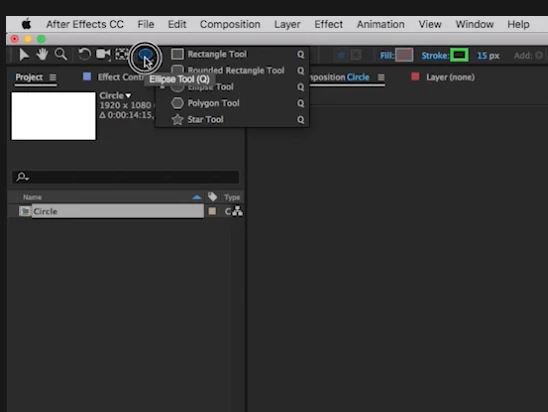
 

I'm on a mac. I try to click the Rectangle shape, right-click it, etc. trying to see the menu with the ellipse, star, and other shapes.  Nothing I do is getting that pop-out menu. I can press Q to roll through the shapes. It's probably a noob issue, but I'm stuck and frustrated. 


I feel like I should be able to pick a different shape without pressing Q to rotate through. 


Thanks for the help.


Correct answer nishu_kush

Hi danrneumann,


Thanks for reaching out.

You can click and hold the mouse pressed for a second to get the rest of the tools.

Let us know how it goes.


Thanks,

Nishu

1 reply

nishu_kush
nishu_kushCorrect answer
Legend
September 11, 2020

Hi danrneumann,


Thanks for reaching out.

You can click and hold the mouse pressed for a second to get the rest of the tools.

Let us know how it goes.


Thanks,

Nishu

danrneumann
Participant
September 14, 2020

Holy heck! Thanks. For me, that was not very discoverable. I'm sure there's a reason for it, but that was confusing! Thanks a ton!