
Participant
December 12, 2016
Question

Shape stroke problems

  • December 12, 2016
  • 2 replies
  • 2321 views

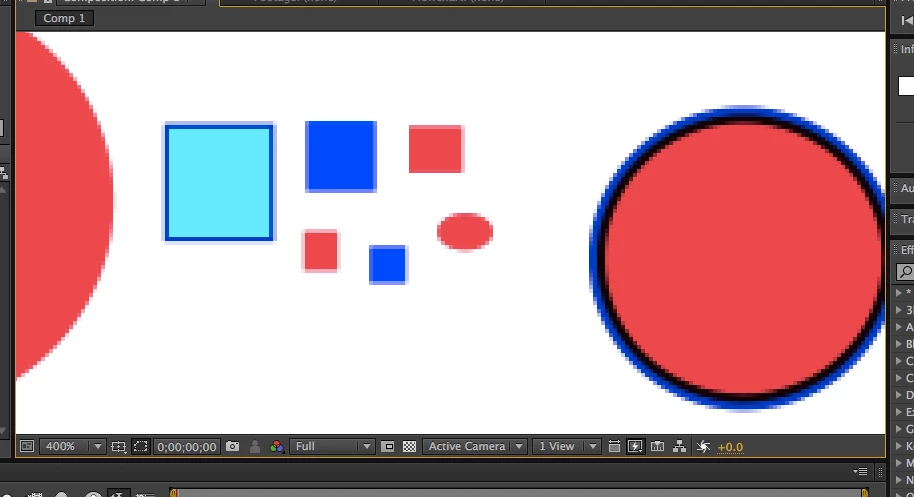
Hello. I am have a problem getting solid shapes in AE CS6. I draw a shape and the outer edges are blurred or a different color. The same thing happens with the stroke. The problem seems to have strated when I strated drawing rectangles with a linear gradient. What's even more confusing is that I downloaded AE CC and the rectangles had perfect strokes and edges. When I opened up a saved comp CC inherited the problem. Seems like the fill and stroke are overlapping as well. What am I missing here?
    This topic has been closed for replies.

    2 replies

    Kevin J. Monahan Jr.
    Community Manager
    Community Manager
    January 12, 2017

    Hi CALIGLAS,

    Was your question answered sufficiently? Please let us know.

    Thanks,
    Kevin

    Kevin Monahan - Sr. Community and Engagement Strategist – Adobe Pro Video and Audio
    CALIGLASAuthor
    Participant
    December 12, 2016

    Ther settings on stroke and fill are normal. Here is a rectangle with a 2 px stroke.

    Community Expert
    December 12, 2016

    First, you are looking at the composition panel at 400%  magnification factor  so you're going to start seeing pixels. this is normal and nothing to worry about because video is always at 100% when rendered.

    Second, in order to have perfect edges your lines must be precisely lined up with the pixel grid. After you have drawn a rectangle then press uu to reveal the modified properties of the shape player and you will find that the rectangle is probably not an even number of pixels high and wide and that the position is not precisely on a whole pixel value. You need to fix that to line things up on the pixel grid. The overall size must be an even number of pixels high and wide if the position values are set to a whole number. You have to also consider the size of the stroke.

    Honestly, unless your shapes are completely static and have very thin strokes applied you will never see the anti-aliasing on the edges. If you animated the position of your shapr layers then you are going to have changing edges as they move. These are the realities of working with pixel based artwork in both print and video. There are no factors in video once it's rendered so you always have to think about the pixels.

    There are a whole bunch of other things you need to consider when animating with thin lines. Stroboscopic effects caused by the movement of a thin line beating against the frame rate can cause disconcerting jumping or judder in the final product.

    I hope this helps. There's nothing wrong with AE, you just have a misconception of how vector objects are converted to pixels.