Inspiring
December 4, 2016
Answered

Sharpen effect increases brightness instead of sharpening

  • December 4, 2016
  • 3 replies
  • 619 views

I'm having a strange issue when applying the Sharpen effect to footage.  As I increase the slider the brightness of the image increases with no change in the sharpness.  Visually it looks the same as applying the Curves effect and pulling the white point to the left.  I've tried it in several projects, including a new blank one with the same result.  Happens on any type of layer, solids included.  I've cleared my cache, trashed preferences and checked the plugin folder to make sure there wasn't something weird happening there and it all looks fine.  No other effect seems to have a problem.  I've added some images as an example.  The Sharpen effect is applied to the bottom and set to 30.  Any ideas on why this is happening?  I'm using 14.0.1 on El Capitan.

This topic has been closed for replies.
Correct answer Roei Tzoref

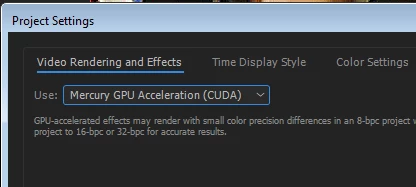
it's the probably GPU acting up. as of CC2015.3 sharpen is (optionally) a GPU accelerated effect: After Effects CC 2015.3 In-Depth: GPU-Accelerated Effects | Creative Cloud blog by Adobe

check your project settings and try to turn in to CPU and not GPU for video rendering and effects

in my system both GPU and CPU are showing the same result, but your GPU is probably different (I have GTX970) so let's check if this is the case.

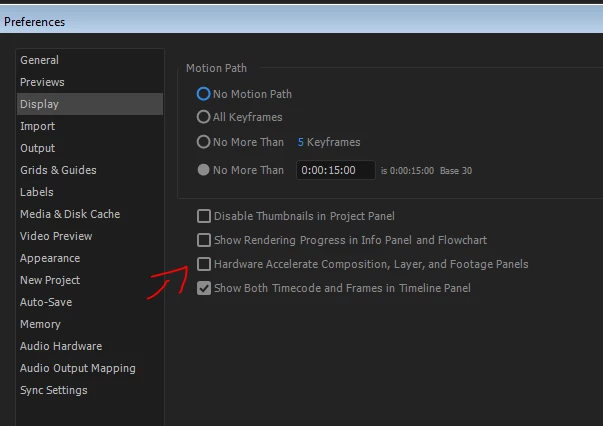
I would also see if this option makes any differences:

3 replies

Kevin J. Monahan Jr.
Community Manager
Community Manager
January 18, 2017

Hi Garret,

Did any of these responses help you? If so, please mark that one as correct.

Thanks,
Kevin

Kevin Monahan - Sr. Community and Engagement Strategist – Adobe Pro Video and Audio
Roei Tzoref
Roei TzorefCorrect answer
Legend
December 5, 2016

it's the probably GPU acting up. as of CC2015.3 sharpen is (optionally) a GPU accelerated effect: After Effects CC 2015.3 In-Depth: GPU-Accelerated Effects | Creative Cloud blog by Adobe

check your project settings and try to turn in to CPU and not GPU for video rendering and effects

in my system both GPU and CPU are showing the same result, but your GPU is probably different (I have GTX970) so let's check if this is the case.

I would also see if this option makes any differences:

waseem103
Inspiring
December 5, 2016

which filter do you use

i used from menu Filter>Blur & Sharpen>Sharpen

the result as expected

Inspiring
December 5, 2016

That would be the same filter I'm using as well.