Participant
December 27, 2021
Question

Shatter effect.

  • December 27, 2021
  • 1 reply
  • 249 views

Hi guys,


Since i'm pretty new to AE i'm playing around with some effects and trying to understand them correctly.

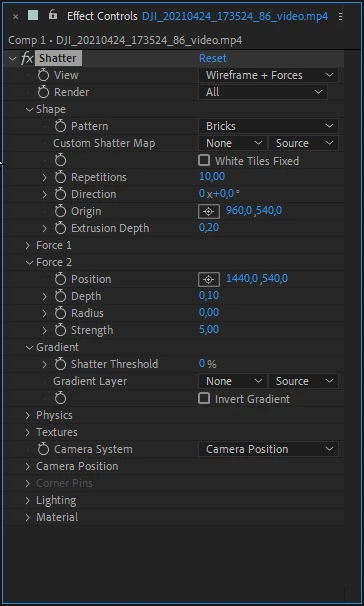
I've opened a video in a composition and i'm applying the so called shatter effect.  I set the view to rendered so I can see what is happening. My problem is that the effect immediately take place. I am thinking of putting a keyframe somewhere so it 'holds'the original position until I want to take the effect place. 


2 question pops up for me :


1.How can i prevent the effect taking please immediately? Is it by keyframing? If yes, which value?


2.How to determine/Where do I see, which values are changing? Because since the effect is taking place right away, I assume values are changed somewhere because the effect is taking place. I can't find them since there are so many and besides that, when I scroll with my mouse in the timeline back and forth, I do 

not see any values changing


Thank you for reading and the reply 🙂

This topic has been closed for replies.

1 reply

Jose Panadero
Community Expert
Community Expert
December 27, 2021

The effect triggers inmediately because the Force 1 is intersecting with your layer. You can control its depth to move in Z axis for no to intersect or change the Strenght value to control when the effect starts. Also you can control when to start using a Gradient Layer (Greyscale image) and animate it using the shatter thresold parameter.


If you move the Z position into de the camera position category (and rotate in any of the axis), you will see a blue sphere representing the force. Probably you will start see clearly how this blue sphere is affecting your image (if you are in the Wireframe+Forces option)


Regarding your second question: this is a simulation effect so no parameters are changing unless you animate them. There are some forces including gravity affecting your pieces as soon as you apply the effect.

Participant
December 27, 2021

Hello Jose,


Thank you very much for your informative post. This really helped me!


Have a nice day.