Inspiring
March 20, 2019
Answered

shortcut for copy/paste interpretation settings not working

  • March 20, 2019
  • 1 reply
  • 313 views

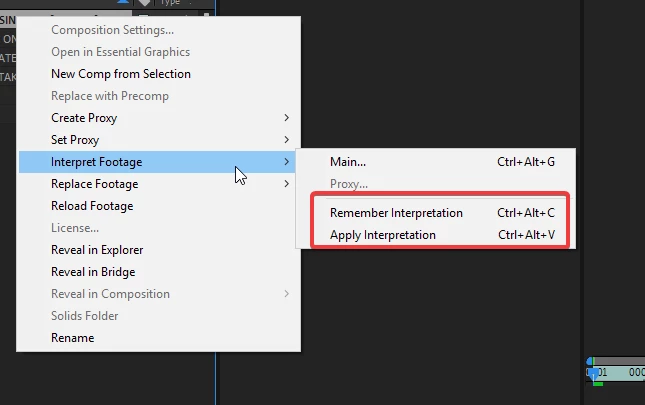
have the latest update of AE. on my machine the remember interpretation and apply interpretation only works when I click to select those options in the menu.

It does not work when I use the keyboard shortcuts??

anyone else has this issue?
    This topic has been closed for replies.
    Correct answer Alenskas

    answered: the keyboard shortcuts from Evernote were over-riding my AE shortcuts! Doh

    1 reply

    Mylenium
    Legend
    March 20, 2019

    And what exact system? What keyboard settings? What else? What footage types?

    Mylenium

    AlenskasAuthorCorrect answer
    Inspiring
    March 20, 2019

    answered: the keyboard shortcuts from Evernote were over-riding my AE shortcuts! Doh