MahaB82A
May 18, 2022
Question

Shot Type

  • May 18, 2022
  • 2 replies
  • 927 views

Do you know any website explain this in detail?


This topic has been closed for replies.

2 replies

MahaB82A
MahaB82AAuthor
May 19, 2022

There was a YouTube tutorial which had an option of "Fixed Angle of View" when I tried to replicate this tutorial I got a distored view then I changed it to "Specify Angle of View" option and give a random value for angle, it worked fine. This is the reason I want to know whether camera will register the angle.


Justin Taylor-Hyper Brew
Community Expert
Community Expert
May 19, 2022

Did you shoot the footage yourself? And if so with what camera and lens? You can use a calculator like this one to find the Horizontal Angle of View from the camera sensor and lens info:


https://www.digitalrebellion.com/webapps/lenscalc?calc=horiz_angle&res_w=4.8&txt_focal=50

MahaB82A
MahaB82AAuthor
May 19, 2022

I do not know anything about camera.

Justin Taylor-Hyper Brew
Community Expert
Community Expert
May 19, 2022
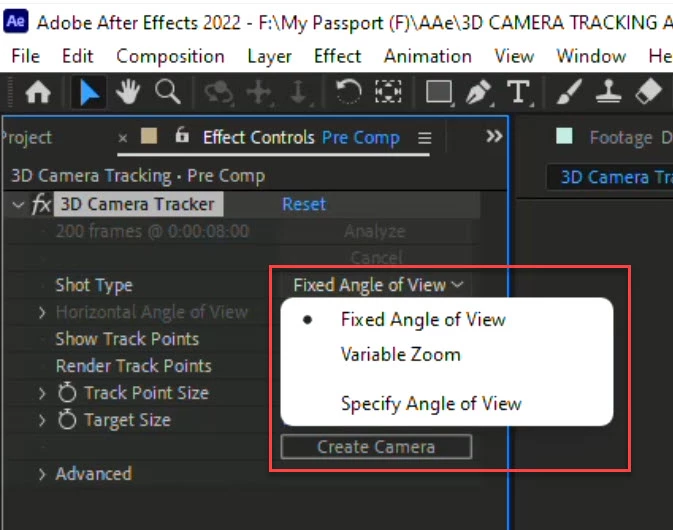
  • Fixed Angle of View
    • Camera lens is fixed or a zoom lens with no zoom motion.
    • After Effects guesses the Angle of View.
  • Variable Zoom 
    • Camera lens is a zoom lens and footage contains zoom motion.
    • After Effects guesses the Angle of View at different moments.
  • Specify Angle of View
    • Camera lens is fixed.
    • You specify the Angle of View by typing in the Horizontal Angle of View.
MahaB82A
MahaB82AAuthor
May 19, 2022

Do you have to input angle registered by camera or you can choose an angle of your own?


Roland Kahlenberg
Legend
May 19, 2022

You will have to obtain the parameters from the camera. You will take note that the premise for 3D Camera Tracking is to mimic the realworld camera. Hence, if you do not know the camera's settings, it is best to use one of the automated settings. Additionally, do you have any specific issues you are facing which requires assistance?

Very Advanced After Effects Training | Adaptive & Responsive Toolkits | Intelligent Design Assets (IDAs) | MoGraph Design System DEV