Legend
November 21, 2021
Answered

Should I put Matte Layers Back into PreComp

  • November 21, 2021
  • 2 replies
  • 301 views

Hello there,


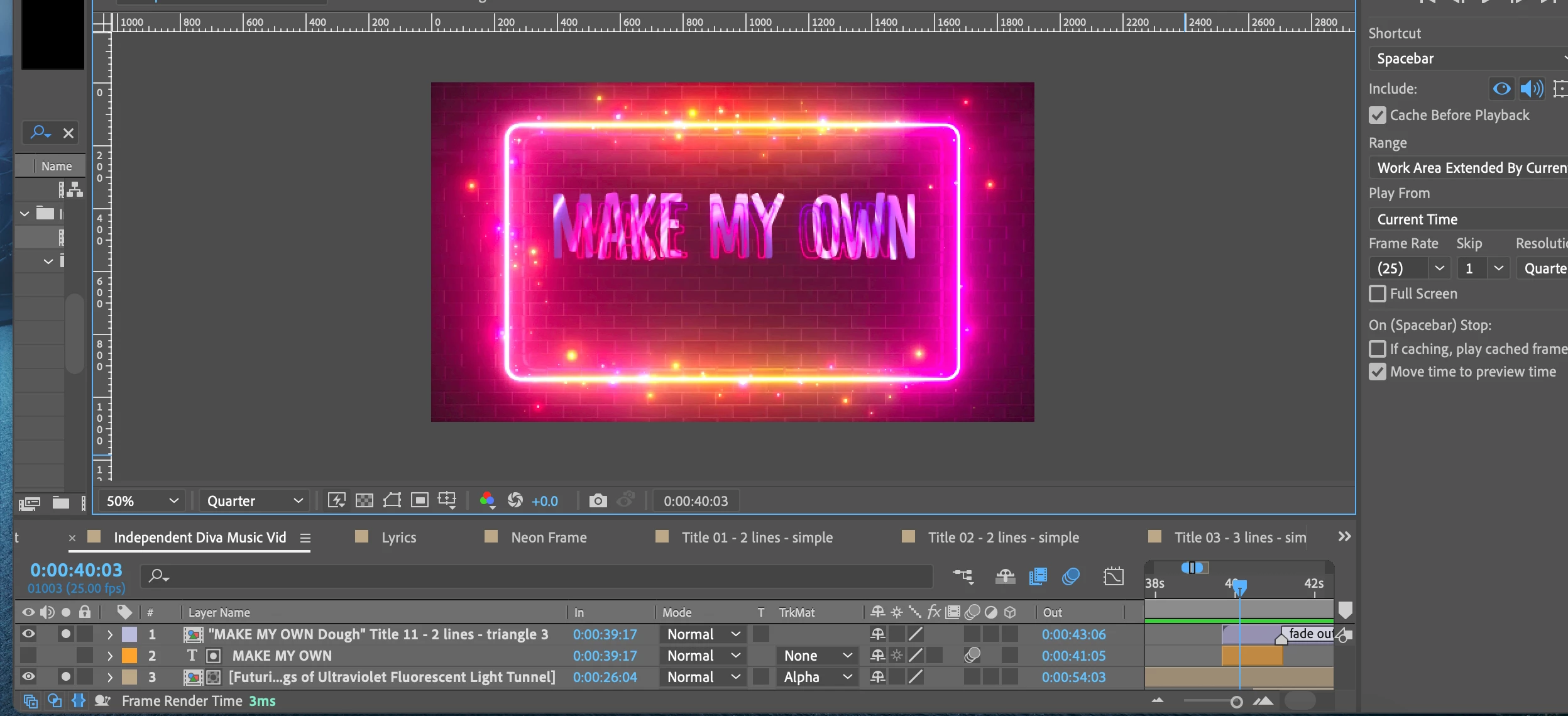
Duplicated a line within the precomp(top layer of the three displayed) and brought it out to add an Alpha Matte using a video file. 

If I were to put it, along with the alpha matted video file, back into the precomp, would it be okay? Or should I leave it out.


Thank you,

One&Done

This topic has been closed for replies.
Correct answer ShiveringCactus

If I'm following this correctly, you've used the Text layer as an Alpha Matte to display a texture.  And now you wish to add this into the precomp.  As long as you copy both layers and retain/reset their layer order in the precomp, that should be fine.  From your screenshot, that appears to be the bottom two layers, I'm not sure what the top layer is doing.

In your second post you say you tried adding these two layers, but only the titles of the two copied in,... OH!  I think I know what you're saying.  What I think has happened is that the temporal position (where their starting point is) has copied over as well, so they are off the comp.   Easy fix: 

  • Select the layers and tap [ this brings their inpoints to the current time indicator.
2 replies

ShiveringCactus
Community Expert
ShiveringCactusCommunity ExpertCorrect answer
Community Expert
November 21, 2021

If I'm following this correctly, you've used the Text layer as an Alpha Matte to display a texture.  And now you wish to add this into the precomp.  As long as you copy both layers and retain/reset their layer order in the precomp, that should be fine.  From your screenshot, that appears to be the bottom two layers, I'm not sure what the top layer is doing.

In your second post you say you tried adding these two layers, but only the titles of the two copied in,... OH!  I think I know what you're saying.  What I think has happened is that the temporal position (where their starting point is) has copied over as well, so they are off the comp.   Easy fix: 

  • Select the layers and tap [ this brings their inpoints to the current time indicator.
One&DoneAuthor
Legend
November 21, 2021

WOW! 

THAT ACTUALLY WORKED!!!!!
MANY THANKS TO SHIVERINGCACTUS!!!

One&DoneAuthor
Legend
November 21, 2021

Tried cutting the lower two layers and inserting into the first layer, but only the titles of the two copied in, not the layer bars themselves.