

burfylurfy
Participant
June 11, 2026
Question

single frame ghosting effects when using scales + built in motion blur.

  • June 11, 2026
  • 1 reply
  • 15 views

i have tried clearing cache, adjusting various settings, frame rates, my own gpu settings, trying it with different clips, different formats, even on solids.

ive tried it across multiple versions of after effects and still nothing, turned off opencl(i have an amd gpu obv) and even fresh installed and still NOTHING what could possibly be causing a single frame ghosting glitch when enabling motion blur + scales 

id also like to state when messing with the motion blur settings, having shutter phase set to 0 does remove this issue however, it is not ideal when set to 0 considering i need smooth motion when doing velocity style editing.

picture included below
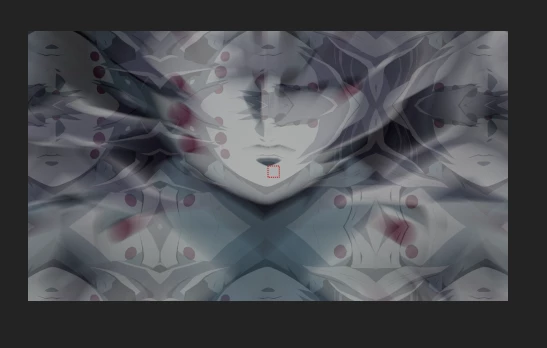
said issue


    1 reply

    Nishu Kushwaha
    Community Manager
    Community Manager
    June 11, 2026

    Hi burfylurfy,


    Thanks for reaching out. Is it happening with this specific media file? Can you test it with a different media in a brand new project? If the issue is specific to a footage, transcoding it should help. If it is happening with any footage, do you mind sharing a sample project and media for testing? Feel free to share files via dM if you prefer not to share them publicly. Also, please share your system specs and the version of After Effects.

    Looking forward to your response.


    Thanks,

    Nishu

    burfylurfy
    Participant
    June 11, 2026

    i will be sending a dm.