thetomrobinson
Participant
December 20, 2017
Answered

Skybox Install dialogue box untickable!

  • December 20, 2017
  • 1 reply
  • 615 views

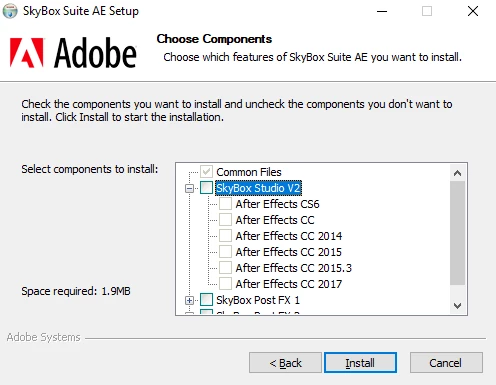
With the recent acquisition of Skybox into the Adobe resources.  I have been unable to install the Skybox Suite plugins I received via email recently from Adobe.

The options to check which components to install do not respond when clicked on and so remain blank!

Adobe updated

GeForce GTX1080 drivers updated to most recent

Any ideas as to why this is?
This topic has been closed for replies.
Correct answer Kevin J. Monahan Jr.

Hi TheTomRobinson,

After effects CC2018 and Premiere Pro are already installed and uninstalled several times.

It is the Skybox plugins I am trying to install.

I recently downloaded them via an email sent to me via Adobe.

These effects are already installed natively. You don't need to install the legacy plug-ins. The last version these plug-ins are supported for are the CC 2017 products. More info: SkyBox to CC 2018 – Integration Chart | Mettle

Thanks,
Kevin

1 reply

ToolfarmJP
Community Expert
Community Expert
December 21, 2017

Hello,

Would you mention the version of After Effects you want to install?

thetomrobinson
Participant
December 21, 2017

Hey there ToolfarmJP,

After effects CC2018 and Premiere Pro are already installed and uninstalled several times.

It is the Skybox plugins I am trying to install.

I recently downloaded them via an email sent to me via Adobe.

Cheers,

Kevin J. Monahan Jr.
Kevin J. Monahan Jr.Correct answer
Legend
December 21, 2017

Hi TheTomRobinson,

After effects CC2018 and Premiere Pro are already installed and uninstalled several times.

It is the Skybox plugins I am trying to install.

I recently downloaded them via an email sent to me via Adobe.

These effects are already installed natively. You don't need to install the legacy plug-ins. The last version these plug-ins are supported for are the CC 2017 products. More info: SkyBox to CC 2018 – Integration Chart | Mettle

Thanks,
Kevin

Kevin Monahan - Sr. Community and Engagement Strategist – Adobe Pro Video and Audio