
Known Participant
March 14, 2026
Question

sluggish preview, resources barely used

  • March 14, 2026
  • 2 replies
  • 138 views

Hi

I am once again asking the boring question : why is ram preview so slow? It takes time to cache and is very jerky when it plays.

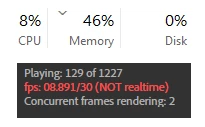
But the reason why I’m asking is that ae barely taps into my computer’s resources at all. I have a ryzen 9, 200 gb ram, an rtx 5090, a 5th gen nvme, and ae barely uses 10% of it… But still lags?

Why???

And it’s a pretty modest scene, nothing crazy.

So, how come? Is there anything I can do?
 

    2 replies

    jefubbudu
    Inspiring
    March 15, 2026

    AE doesn't really use GPU, that thing's wasted on this 1993 software, made before modern GPU's. Same for multi-core CPU's to a point. It'll hot all your RAM because it stores previews there (4k is about 1 second/gig). "Multi-frame rendering" is largely just multiplying the entire renderer to each core, so you're actually increasing overhead with each core you add, and I'm pretty sure the first core also handles RAM allocation and UI, which is why things can hitch. Only a few effects use GPU, and I've found it just makes the software less stable.


    We've been asking for real multithreading, migrating effects to GPU, deep image handling for well over a decade now. We want a modern recreation. The technical debt is overwhelming. From 2012 to 2022 AE actually got about 25% slower on my PC. When i lost a returning customer to all this nonsemse, i decided to drop it as a professional tool.


    After Effects IS the bottleneck. Good luck.

    Dee-SAuthor
    Known Participant
    March 16, 2026

    It’s not even using cpu or disk either, it’s just sitting there lmao…. So, what do you use instead?

    jefubbudu
    Inspiring
    March 16, 2026

    Well i could pull off some pretty quick renders with an intel 6700k, a 1070, and 32 gigs of ram. A 30 second clip of 4k or 5k would take most of an hour to render though, even if it was just some masks to hide a lens flare or something. I'd have the extra resources to watch a video or play some CSGO while I waited, but multiple exports gets weird and totally doesn't scale. That's just me though, and my experience on the last pro shot i got using AE.

    Community Expert
    March 14, 2026

    Have you tried decreasing the size of the preview window for a smoother experience?

    Vadym B.
    Inspiring
    March 14, 2026

    The problem is not the size of the window, but why are all the resources not being used? I am also concerned about this problem, because I have the same one. Everything could be played smoothly and quickly, but instead the CPU is resting and the GPU is in a deep sleep.