
iuyi71168881
Participant
May 3, 2019
Answered

Smoothing of hard lines

  • May 3, 2019
  • 3 replies
  • 12286 views

I bought after effects specifically so i can use it to make anime.

A friend of mine who is more familiar with the process says after effects is what smooths out the incoming animation cels like this
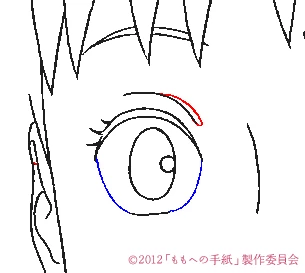
See how the edges are very jagged.

However in they should be like this

uMpROER.png

According to my friend after effects is responsible for smoothing the lines of the first image into lines like the second, but I really cant figure out which plugins to use

The best I came up with was Gaussian blur but that makes the lines too thick.
    This topic has been closed for replies.
    Correct answer iuyi71168881

    Just want to update that I found my answer

    there is a free japanese plugin called OLM smoother

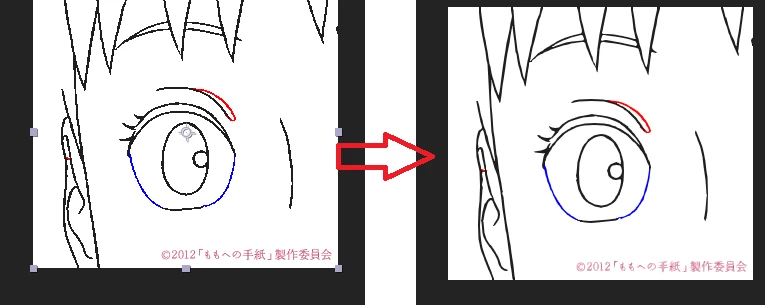
    Here is an example with the previous image I linked, this is default settings.

    You can download it here Tools OLM Digital R&D

    3 replies

    iuyi71168881
    iuyi71168881AuthorCorrect answer
    Participant
    May 4, 2019

    Just want to update that I found my answer

    there is a free japanese plugin called OLM smoother

    Here is an example with the previous image I linked, this is default settings.

    You can download it here Tools OLM Digital R&D

    Participant
    October 19, 2021

    Chould you please show me the steps to add this to the effects menu of after effects.I am having a lot trouble with it


    Community Expert
    May 3, 2019

    If the lines are vectors they need to be at least 2 pixels wide to be properly anti-aliased. Single pixel lines do not work for video unless they are horizontal or vertical and perfectly aligned with the pixel grid. Your lines look like they are a single pixel wide and the quality of the layer is draft. Personally, I never used a curved line that is animated in a video that is not at least 3 pixels thick and I try and never use 100% black against 100% white. That combination never reacts well to compression.

    If the lines are pixels (raster images) then you are stuck. You'll have to redo the artwork and make the lines thick enough for video. Roland's idea of using a matte choker will only work if the lines are more than one pixel thick. Choking a really thin black line will give you a soft grey one.

    Roland Kahlenberg
    Legend
    May 3, 2019

    Try to add Effect > Matte > Simple Choker and set its Choke Parameter to a negative value - this will shrink the edges; resulting in thinner line edges.

    Very Advanced After Effects Training | Adaptive & Responsive Toolkits | Intelligent Design Assets (IDAs) | MoGraph Design System DEV