
Mike Coopey
Participant
October 2, 2020
해결됨

Solution for 'blank frame' during Time Remapping loopOut() looped comp

  • October 2, 2020
  • 27 답변들
  • 17263 조회

Hi,

I have been going crazy looking for a solution to how to solve the 'blank frame' glitch when creating a looping composition using the loopOut() expression.
I tried the current/previous solutions which involved adding a keyframe on the penultimate frame or manually setting the final keyframe value -1 frame. These worked, but I was still getting a visible animation glitch happening.


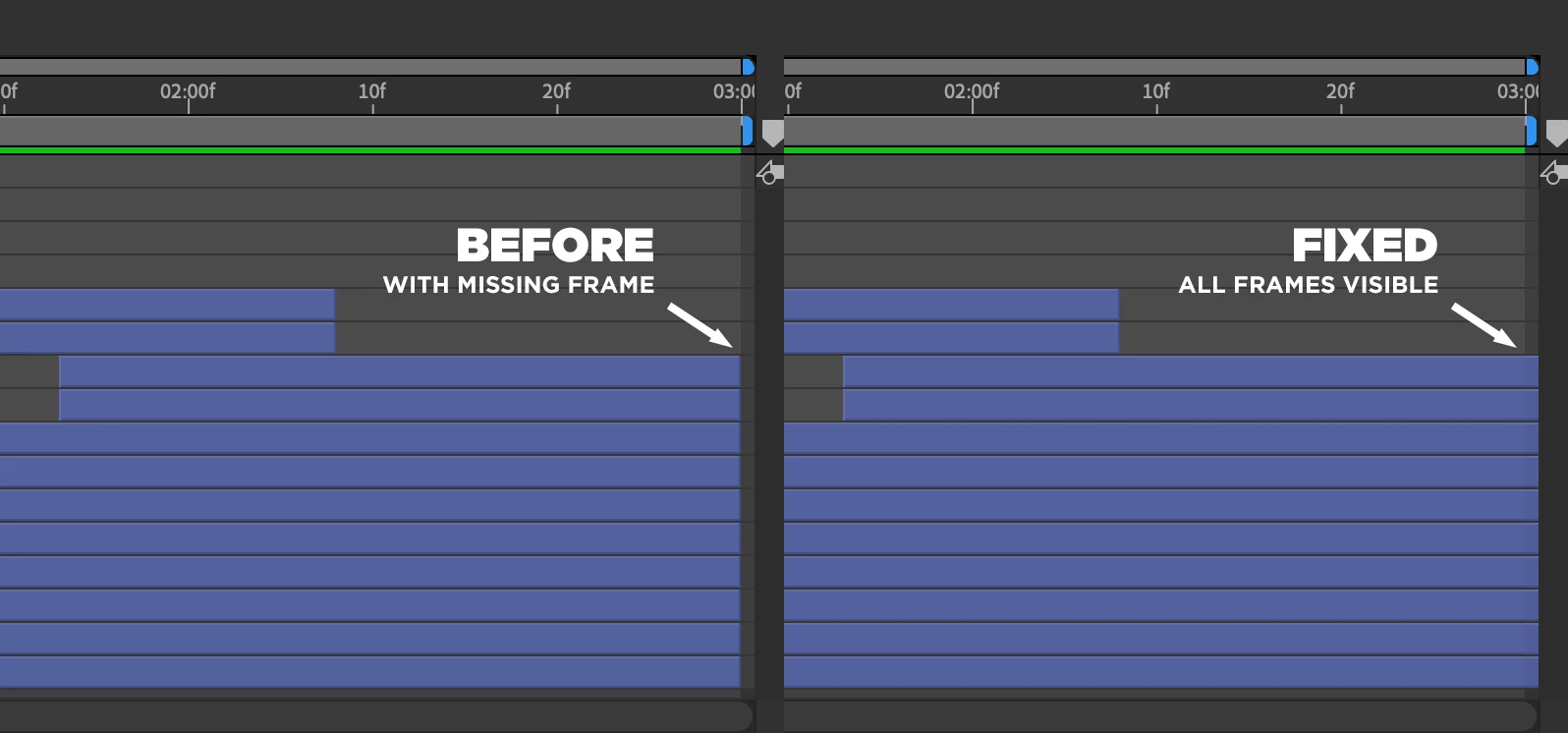
My final solution, for a perfect loop with zero visible glitches or blank frames, was to open the pre-comp layer (the original composition that you're trying to loop) and for every layer that reaches the final frame, drag it beyond the end. These layers may appear to run to the very end of the comp and appear as though they reach the final frame, but manually dragging the end of the layer 'off' to the right of the comp was what was needed for that final 'missing' frame to show in the precomp loop.

So, starting with a Time Wrapping comp that is showing a blank frame:

1. Double-click the comp to show the contents

2. Scroll to the final frame

3. Drag all layers to the right 'beyond' the final frame


Hopefully, that blank frame has now gone.
 

최고의 답변: Evan_L

None of the solutions worked for me. But, I have found an actually TRUE solution (for me at least) Literally all I had to do was enable continuos rasterization. No, seriously that’s it. Try that and it might work


Edit: Ok now it’s not working again and I’ve had to resort to using this expression instead:
time%key(numKeys).time

27 답변

cartergray23456
Participating Frequently
August 20, 2026

Great find! Extending the layers slightly beyond the final frame seems to be the key to eliminating that annoying blank-frame glitch. Thanks for sharing a practical fix.

Evan_L
Evan_L답변
Participant
February 11, 2026

None of the solutions worked for me. But, I have found an actually TRUE solution (for me at least) Literally all I had to do was enable continuos rasterization. No, seriously that’s it. Try that and it might work


Edit: Ok now it’s not working again and I’ve had to resort to using this expression instead:
time%key(numKeys).time

Participant
July 11, 2026

oh god FINALLY THANK YOU!!!!! I was geniuely losing my mind over the stupidiest After Effect glitch existing ever. How this isnt fixed yet?

Participant
June 21, 2024

Tried many solutions mentioned here.
The one that worked was checking that all compositions had the same frame rate (eg 24fps).
Sometimes whem pre-composing, the specs would change to "Custom". Adjusting them to be as close as possible (and the fps exactly the same) solved my issues. For now.

Best of luck.

franzen
Participating Frequently
June 23, 2025

Nothing I've read works for me. The only thing that has worked for me is replacing the loopOut expression with 

time%key(numKeys).time


Thanks to the creative COW site for the solution!
Here's the article 

Participant
July 3, 2025

Thanks for this! This expression does exactly what you would expect loopOut to do.

Would it be asking too much just to have a dedicated Loop tool built into After Effects instead of having to use script...? You have menu functions for stretching, remapping or reversing but not looping. You can loop footage that you import easily, but not comps that you create. Why not? Many artists don't want to have to learn Javascript programming just to access functions that they can reasonably expect to be part of the toolset, and even those who do end up having to use workarounds to make it work properly.
Don't get me wrong, I use scripting a lot and it makes After Effects way more powerful and versatile...but it shouldn't be necessary for something as fundamental as looping.

Participating Frequently
May 27, 2024

After you enable time remap you get 2 keyframes. add your loop expression then go to the last keyframe, go back one keyframe, add one keyframe and delete the last. Hope this makes sense. This should remove the issue. 

Participant
June 13, 2024

This doesn't work for me. I go back one, add keyframe, delete one at the end, then it just pulls the black frame forward by one frame

Participant
May 24, 2024

That is a bug , when I am using After effect 7.0 , What are you doing adobe?  10 years , the bug is still here!~ Ya, I am fixing this problem the same way like yours!~ Can't imagine in 2024 , I still fixing this bug everyday. 

troytooner
Participant
August 3, 2023

Tried that. Did not work.

[TOXGG]BIGBOSS
Participating Frequently
March 30, 2023

Thank you for sharing your solution with others who may be experiencing the same issue. Your advice could be very helpful to someone who is struggling to create a seamless loop in their composition.

Best of luck with your future animation projects!

Participant
March 30, 2023

So What I've figured out was loopOut() doesn't work in whole number frame rates... for some reason. I was working in 30 fps and my comp would go blank for TWO frames, not just one. When I switched it to 29.97 fps it didn't do any skipping. Fix it adobe.

Participant
March 30, 2023

Never Mind. Rendered it out and still didn't work. Adobe please fix this problem. 

Participant
February 20, 2023

I really don't understand how something so simple and fundamental to Animation like Looping just doesn't work in AE. I do a lot of Animation in other Software and it's astonishing how buggy this "Industry Standard" is. And what's even more frustrating, there is no way of expressing this frustration towards Adobe. There is no way to leave a public review or a Rating, so you find yourself ranting in some community thread about how to make the simplest thing just work. And when the community expert thinks a 8 step workflow is simple, for sth that should basically require one click, it's pretty apparent that the software and workflow is fundamentally flawed. No disrespect, just frustration about a corporation that has a lag of competition and therefore no apparent ambition. 

Participant
February 27, 2023

I am beyond done with After Effects and Adobe. They are a predatory, sketchy company focused on sucking your bank account dry, making it insanely difficult to leave their ecosystem, and providing unstable, unuseable products. What is worse is that everyone has a different solution to this blank frame problem and so far none of them have worked for me. I am in need of better alternatives to AE. Good-bye and good riddance Adobe.

Participant
January 5, 2022

Didn't work for me but found an easier one, at least in my case:


Duplicate first frame inside comp (one extra frame). Add time-remap but add a keyframe one frame before the end and delete the last one. Add loop, cut first frame of the comp and move left one frame.